A gym liability waiver is the form a member or visitor signs before using your gym. It explains the risks of exercise and equipment, records their agreement to your gym rules, and releases the gym from certain claims arising from the ordinary risks of working out.
Gyms see new members, drop-in visitors, guest passes, class attendees and regulars who train most days. Dropped weights, pulled muscles, treadmill falls and overexertion are part of fitness, so almost every gym, health club and fitness studio asks people to sign a waiver before they start.
This guide covers what a gym liability waiver is, what to include, how to handle guests, 24/7 access and minors, a sample structure you can adapt, and how to collect gym waivers online before people reach the front desk. It is general information, not legal advice. Waiver rules differ between countries and states, so have your final waiver reviewed for where you operate.
What is a gym liability waiver?
A gym liability waiver, also called a gym waiver form, fitness waiver or gym release form, is a document in which the member:
- acknowledges the risks of exercise and using the facility
- agrees to follow the gym's rules and staff instructions
- confirms they are fit to exercise, or have checked with a doctor
- releases the gym from certain claims, to the extent permitted by law
- signs and dates the form, or has a parent or guardian sign for them
Most gyms ask members to sign when they join and keep the waiver on file for the length of the membership. Drop-in visitors and guests usually sign before each visit or once a year. Many gyms also ask everyone to re-sign when the waiver wording changes.
Why gyms need a liability waiver
Even well-maintained gyms with trained staff can't remove every risk. A clear, signed waiver helps you:
- show that the member was told about the risks before training
- record that they agreed to your rules, such as re-racking weights and using spotters
- collect emergency contact and health information
- keep a record of parental consent for teenagers
- limit certain claims, where local law allows it
A waiver is not a substitute for safe operations, equipment maintenance, staff training and insurance. Courts in many places won't enforce a waiver against gross negligence or reckless conduct, such as ignoring a broken machine that members reported. For more on what can undermine a waiver, see what makes a liability waiver invalid.
What should a gym liability waiver include?
1. Member details
- full name and date of birth
- phone number and email
- emergency contact name and phone number
- membership type, for example full member, drop-in, guest pass or class pack
2. Description of activities and areas
Name what the waiver covers so there is no doubt about scope:
- free weights, machines and cardio equipment
- group fitness classes, such as HIIT, spin, boxing or circuit training
- personal training sessions, if delivered at the gym
- functional training areas, turf, rigs and sleds
- saunas, steam rooms, pools and showers
- outdoor workouts, runs or bootcamps run by the gym
If you run classes or personal training as a separate service, our guide to the personal training liability waiver covers the extra wording trainers usually need.
3. Specific exercise risks
Generic wording like "exercise involves risk" is weaker than naming the real risks. A gym waiver usually lists:
- muscle strains, sprains, tears and joint injuries
- injuries from dropped or falling weights and plates
- equipment malfunction or misuse, such as a treadmill fall or a cable snapping
- slips and falls on wet floors, in changing rooms or near pools
- overexertion, dizziness, fainting, and in rare cases heart attack or stroke
- heat-related illness in saunas, steam rooms and hot classes
- being hit or injured by other members' equipment or actions
4. Assumption of risk
The member confirms they understand the risks, that staff and equipment checks reduce but don't eliminate them, and that they choose to exercise anyway.
5. Gym rules
Include the rules members agree to follow, or link to them and have the member confirm they have read them. Common rules:
- use equipment only as intended and ask staff if unsure
- use collars on barbells and a spotter for heavy lifts
- re-rack weights and wipe down equipment after use
- report damaged or faulty equipment to staff straight away
- wear suitable clothing and closed-toe shoes
- don't bring guests in without registering them
- no training under the influence of alcohol or drugs
6. Health and fitness
Ask members to confirm they are physically able to exercise, and to check with a doctor first if they have any doubt. Give them space to note conditions that matter, such as heart conditions, high blood pressure, recent surgery, pregnancy, diabetes or asthma. A short pre-exercise questionnaire, such as the PAR-Q, is a common way to do this. Only ask for the health information you actually need, and store it securely.
7. Unsupervised and 24/7 access
If members can train when no staff are on site, say so clearly. State that staff may not be present, that members train at their own risk during unstaffed hours, and how to call for help, such as emergency buttons or phone numbers. Many 24/7 gyms also ask members not to train alone on heavy lifts and to keep their access card or app to themselves.
8. Personal property
State that the gym is not responsible for lost, stolen or damaged items, including items left in lockers, changing rooms or the car park, to the extent permitted by law.
9. Release of liability
The release section states which claims the member gives up, to the extent permitted by law. Keep it clear and visible, not buried in small print. Our release of liability form guide explains how release wording works.
10. Medical treatment consent
Allow staff to give first aid, use a defibrillator and call emergency services if needed, and state who is responsible for medical costs.
11. Photo and video consent
If you post photos of members or classes on social media or your website, ask for consent as a separate checkbox rather than bundling it into the release.
12. Signature and date
End with an agreement checkbox, the member's signature and the date. For digital waivers, the signing date and time can be recorded automatically.
Guest passes and drop-in visitors
Guests and drop-ins are easy to miss. A member brings a friend, someone buys a day pass, or a visitor turns up for one class. Every person who uses the gym should sign, not only paying members:
- ask guests to sign before they enter, using the same waiver or a shorter guest version
- record who invited the guest, if your guest policy depends on it
- for day passes and class bookings, include the waiver link in the booking confirmation
Gym waivers for minors
Many gyms allow teenagers to train, often from 14 or 16 with conditions. For anyone under 18, or the age of majority where you operate:
- a parent or legal guardian should sign the waiver
- record the minor's name and date of birth, and the guardian's name and contact details
- state your rules for younger members, such as restricted areas, supervised hours only, or a required induction
- don't let minors use the gym during unstaffed hours unless you have a clear policy for it
Some places limit how far a parent can waive a child's claims, so check local rules. Our guide to waivers for minors covers this in more detail.
Gym liability waiver sample structure
Use this outline as a starting point. Replace the bracketed details with your own and adapt each section to your gym and location.
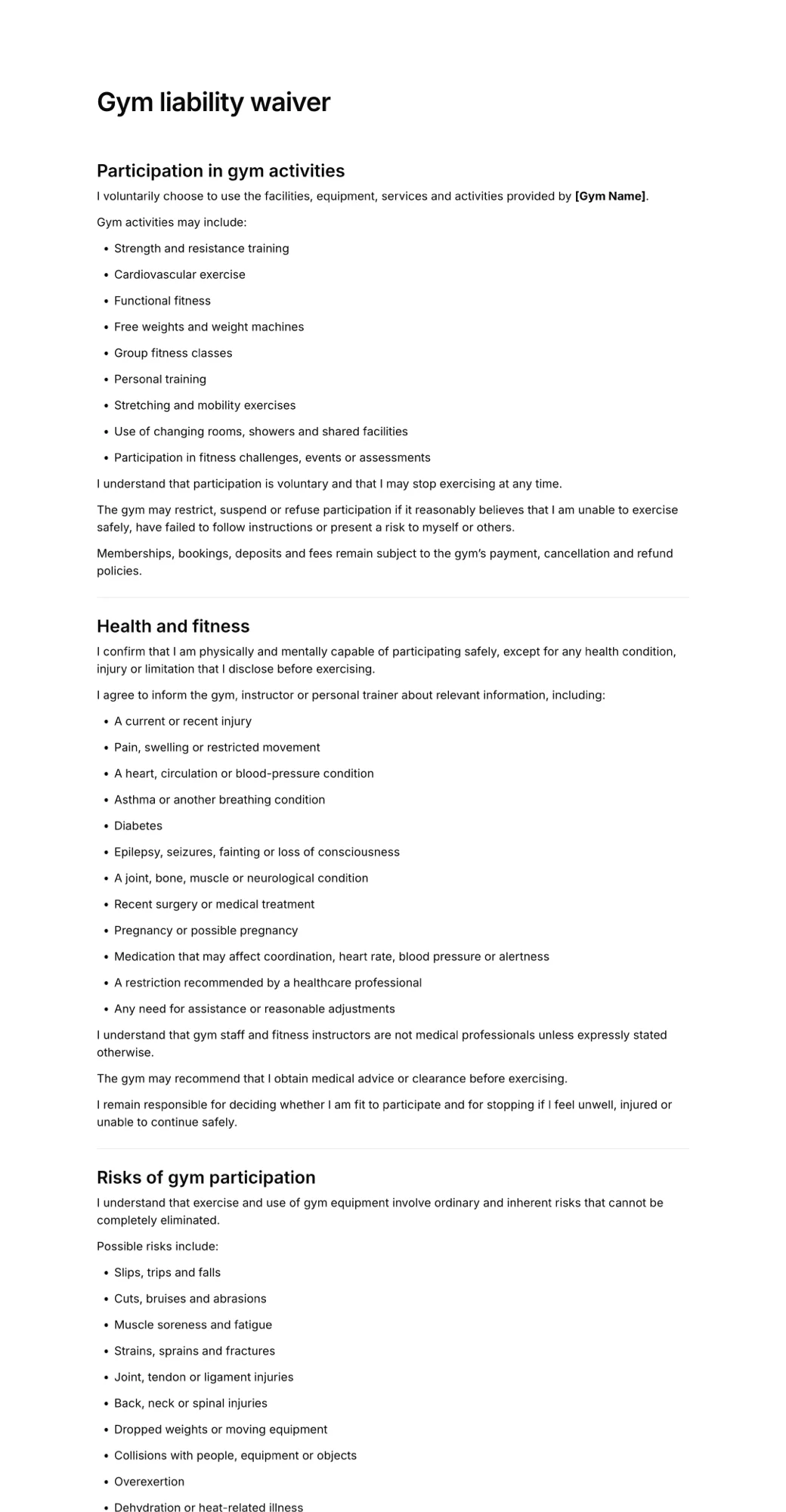
Gym Waiver and Release of Liability
Gym: [Gym Name], [address], [phone], [email].
Member: full name, date of birth, phone, email, emergency contact, membership type.
Activities: This waiver covers use of the gym, equipment, classes, personal training and facilities, including [sauna, pool, outdoor areas], at [Gym Name].
Risks: I understand that exercise and use of gym equipment involve risks, including strains, sprains, injuries from weights or equipment, slips and falls, overexertion, and serious injury.
Rules: I will follow the gym rules and staff instructions, use equipment only as intended, and report damaged equipment straight away.
Health: I am physically able to exercise and have disclosed any condition that could affect my safety. I will consult a doctor before exercising if I am unsure.
Unstaffed hours: I understand staff may not be present during [hours], and that I train at my own risk during those times.
Personal property: [Gym Name] is not responsible for lost, stolen or damaged personal property.
Release: To the extent permitted by law, I release [Gym Name], its owners, staff and contractors from claims arising from the ordinary risks of exercise and using the facility.
Medical consent: I consent to first aid and emergency medical treatment if needed.
Minors: If the member is under [age], their parent or legal guardian signs below.
Agreement: I have read this waiver, understand it, and agree to its terms.
Signature and date.
Common mistakes in gym liability waivers
- Generic risk wording. A waiver that never mentions weights, machines or overexertion is harder to rely on.
- Not covering every area. If the waiver only mentions the gym floor, a sauna, pool or class injury may fall outside it.
- No mention of unstaffed hours. 24/7 gyms should say clearly that staff may not be present.
- Guests who never sign. Friends on guest passes and drop-ins need a signed waiver too.
- Waivers buried in the membership contract. Keep the waiver as a clearly titled document or section the member actually reads.
- Old wording on file. Ask members to re-sign when you update your waiver.
- Paper forms you can't find. A waiver only helps if you can locate it when you need it.
Paper vs online gym waivers
Paper waivers slow down sign-ups at the front desk and pile up in filing cabinets. With online gym waivers:
- new members sign on their phone as part of joining online
- walk-ins and guests scan a QR code at reception instead of filling in a clipboard form
- 24/7 gyms can collect waivers without a staff member present
- you can search every signed waiver by name and open it in seconds
See how to create a QR code waiver for setting up a front-desk QR code.
How to create a gym liability waiver online
Here is how to set one up with AgreeDock:
Step 1: Start from a template or AI
Open the gym liability waiver or gym waiver form template, or describe your gym to the AI waiver generator to get a draft written for your equipment, classes and rules.
Step 2: Add your rules and risks
Edit the activities, risks, gym rules and unstaffed-hours wording to match your gym, and add a link to your full house rules if you have one.
Step 3: Add member fields
Include contact and emergency details, membership type, health questions, a minor and guardian section, a photo consent checkbox, and an agreement checkbox above the signature.
Step 4: Share the link or QR code
Add the signing link to your online sign-up flow, day pass and class booking confirmations, and display the QR code at reception for walk-ins and guests.
Step 5: Check before members start
Every signed waiver appears in your Signatures list with the member's answers and the exact wording they agreed to, and you can download each one as a PDF.
See how gyms and fitness studios use AgreeDock for member waivers and intake forms.
Frequently asked questions
What is a gym liability waiver?
A gym liability waiver is a form members and visitors sign before using a gym. It explains the risks of exercise and equipment, records their agreement to the gym rules, collects emergency contact and health details, and releases the gym from certain claims to the extent permitted by law.
What should a gym waiver include?
Most include member details and emergency contact, the activities and areas covered, specific exercise risks, an assumption of risk, gym rules, health questions, unstaffed-hours wording if relevant, a personal property clause, a release of liability, medical treatment consent, optional photo consent, and a signature and date.
Are gym liability waivers enforceable?
Often, but not always. Enforceability depends on local law, how clearly the waiver is written, and what happened. Many courts won't enforce a waiver against gross negligence, such as ignoring equipment you knew was broken, and some places limit waivers more broadly. Have your waiver reviewed by a local lawyer.
Do guests need to sign a gym waiver?
Yes. Anyone who uses the gym, including guests, day-pass visitors and people attending a single class, should sign a waiver before they start. Sending the waiver link with bookings, or using a QR code at reception, makes this easy.
Can a minor sign a gym waiver?
Usually not on their own. For members under 18, or the age of majority where you operate, a parent or legal guardian should sign. Some places limit how far a parent can waive a child's claims, so check local rules.
How often should gym members sign a waiver?
Most gyms ask members to sign when they join and again whenever the waiver wording changes. Drop-in visitors often sign on each visit or once a year.
Can gym members sign a waiver online?
Yes. Electronic signatures are recognised in many countries, including under the ESIGN Act and UETA in the United States. Members can sign on their phone when they join online or by scanning a QR code at reception, and you keep a signed record of each waiver.