The best childcare enrollment software for most centers is a full childcare management platform: brightwheel, Procare, Playground, Lillio or Kangarootime for centers that want enrollment, billing, attendance and parent communication together, and Famly if you want published prices. If you only need parents to fill in and sign daycare enrollment forms online, a form tool like Jotform or AgreeDock is far simpler and cheaper, though neither handles billing or attendance.
This guide is for daycare directors, preschool owners, home daycare providers, nanny agencies and babysitters choosing how to handle enrollment paperwork. AgreeDock is our product, so we've included it, and we've tried to be straight about where other tools fit better. It isn't childcare management software. Prices were checked on vendor websites in November 2026 and can change. Most childcare platforms don't publish prices at all, so we've said so rather than guess.
Quick comparison
| Tool | Type | E-signatures | Starting price |
|---|---|---|---|
| AgreeDock | Signed forms only | Yes | Free, Pro $15/mo |
| brightwheel | Childcare management | Yes | Pricing on request |
| Procare | Childcare management | Digital contracts listed | Pricing on request |
| Playground | Childcare management | Yes, on parent forms | Pricing on request |
| Kangarootime | Childcare management | Yes, at check-in/out | Pricing on request |
| Lillio | Childcare management | Not confirmed | Pricing on request |
| Famly | Childcare management | Not confirmed | $49/mo up to 30 children |
| Jotform | General form builder | Yes | Free, Bronze $34/mo |
How we chose
Daycare enrollment involves a stack of forms: the enrollment application, parent handbook acknowledgment, tuition agreement, emergency contacts, authorized pickups, allergy and medical information, medication authorization, photo consent and field trip permission. We looked at:
- Daycare software with e-signature. Whether parents can sign enrollment forms and agreements digitally, and whether the vendor's own pages confirm it.
- Enrollment workflow. Online applications, waitlists and turning an applicant into an enrolled child.
- Everything else. Billing, attendance, check-in and out, and parent communication.
- Pricing transparency. Published prices, quotes, and whether there's a free plan or trial.
- Fit for size. A 200-child center and a home daycare need very different tools.
This comparison is based on vendor sites and public documentation, not a long hands-on test of every product.
1. AgreeDock
AgreeDock is a tool for waivers, consent forms, intake forms and agreements, not childcare management software. It doesn't do billing, attendance, waitlists or parent messaging. It fits when you need parents to sign enrollment paperwork online and you handle the rest another way, for example a home daycare, a nanny or babysitter, a drop-in program or a small preschool.
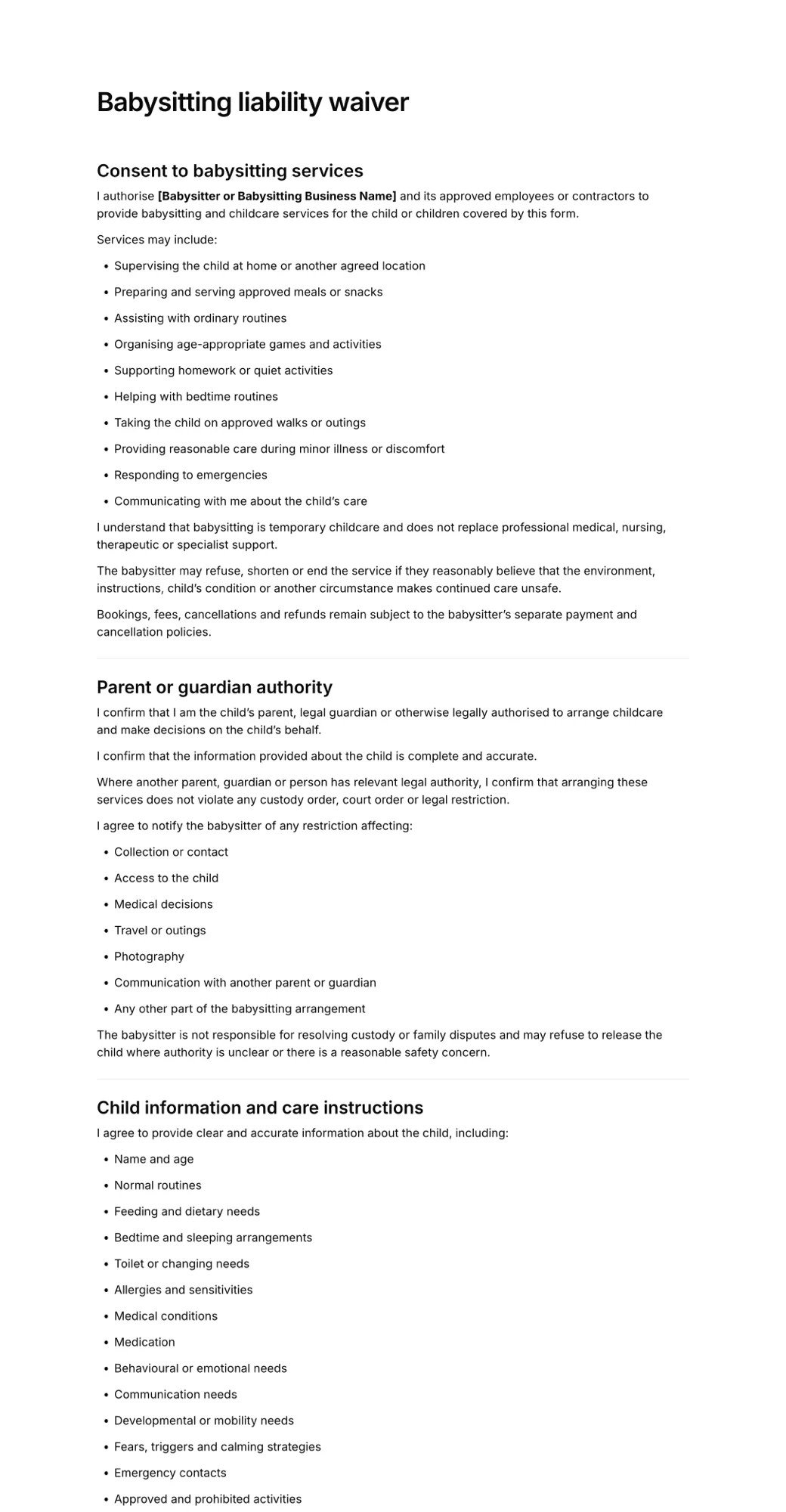
Start from the babysitting liability waiver, the parental consent form or the photo consent form, or describe your program to the AI waiver generator. Add fields for the child's details, emergency contacts, authorized pickups, allergies and medical consent. Parents sign from a link or QR code, and every form is saved with the answers and the exact wording agreed to, searchable by name and downloadable as a PDF.
Best for: Home daycares, babysitters, nannies and small programs that need signed enrollment and consent forms without a full management system.
Pricing: Free plan forever with 1 active form and 10 signatures per month. Pro is $15/month, or $10/month billed yearly ($120/year), with unlimited signatures.
Strengths:
- Real signature field with guardian and minor sections
- Simple to set up in an afternoon
- Flat, low price at any volume
- PDF of every signed form for your records or licensing inspections
Drawbacks:
- No billing, tuition payments, attendance or check-in
- No file upload, so parents can't attach immunization records
- No conditional logic
- No HIPAA BAA, so check which rules apply to the health information you collect
- No integrations with childcare software
2. brightwheel
brightwheel is a childcare management platform. Its pricing page lists digital signatures under attendance, custom digital forms for admissions, and custom forms and management. Pricing is customized through a request form, and brightwheel's own blog says some states, such as Kentucky, offer it free through state partnerships.
Best for: Centers that want admissions forms and signatures inside a full childcare platform.
Pricing: Pricing on request. Check whether your state has a partnership that covers it.
Strengths:
- Digital signatures and custom digital forms for admissions
- Signatures tied to attendance
- Free in some states through partnerships
Drawbacks:
- No published prices
- No free plan mentioned on the pricing page
- More than a home daycare or babysitter needs
3. Procare
Procare is a childcare management system. Its site lists online registration, digital enrollment contracts and permission slips. It doesn't use the term "e-signature" on its feature page, so confirm how signing works in a demo. Procare says it charges one monthly price with no per-child charges and no setup fees, but the price itself is by quote.
Best for: Established centers that want a full system with enrollment contracts and permission slips.
Pricing: Pricing on request.
Strengths:
- Online registration and digital enrollment contracts
- Permission slips
- No per-child charges or setup fees, per the vendor
Drawbacks:
- No published prices
- Confirm signature details in a demo
4. Playground
Playground is a childcare management platform with signature fields on parent forms. According to its help docs and changelog, parents can draw or type a signature once, and signatures are timestamped. Pricing is by demo only.
Best for: Centers that want signed parent forms inside a full childcare platform.
Pricing: Pricing on request.
Strengths:
- Signature fields on parent forms
- Drawn or typed signatures with timestamps
- Part of a full management platform
Drawbacks:
- No published prices
- Sales demo required to see pricing
5. Kangarootime
Kangarootime is a childcare management platform with an online enrollment form for each center and photo plus e-signature capture at check-in and check-out, per its help docs. We found no evidence of e-signatures inside the enrollment form itself, so ask about it if signed enrollment agreements matter to you.
Best for: Centers that want signed check-in and check-out alongside online enrollment.
Pricing: Pricing on request. The site offers a call rather than a pricing page.
Strengths:
- Online enrollment form for each center
- Photo and e-signature at check-in and check-out
Drawbacks:
- No published prices
- E-signature on enrollment forms not confirmed
6. Lillio
Lillio, formerly HiMama, is a childcare management platform. Its pricing page doesn't list prices and points you to sales. We couldn't confirm e-signatures on enrollment forms.
Best for: Centers that already like Lillio's platform and can confirm signing details in a demo.
Pricing: Pricing on request.
Strengths:
- Full childcare management platform
- Sales team can walk you through enrollment setup
Drawbacks:
- No published US prices
- E-signature on enrollment not confirmed
7. Famly
Famly is the only childcare management platform in this list with clear published US prices. It includes custom registration forms, waitlists and sign-in and sign-out, and its pricing page mentions keeping permission slips in the app. The page doesn't explicitly confirm e-signatures, so check before you rely on it for signed contracts.
Best for: Centers that want transparent pricing based on enrollment.
Pricing: Priced by children enrolled: $49/month for up to 30, $79 for up to 50, $99 for up to 70, $119 for up to 100, $139 for up to 150, $159 for up to 200 and $179/month for 201 or more, as listed in November 2026. A free trial is offered.
Strengths:
- Published prices that scale with enrollment
- Registration forms and waitlists
- Sign-in and sign-out included
Drawbacks:
- E-signatures not explicitly confirmed on the pricing page
- Price rises as enrollment grows
8. Jotform
Jotform is a general form builder with a native signature field, conditional logic, file uploads and payment fields. A daycare can build an enrollment application that collects immunization uploads and a signature in one form. It isn't childcare software, so there's no attendance or billing.
Best for: Small programs that want custom enrollment forms with uploads and signatures.
Pricing: Free Starter plan with 5 forms, 100 submissions and 10 signed documents per month. Bronze is $34/month billed annually ($39 monthly), as listed in November 2026. HIPAA features are only on Gold, at $99/month billed annually.
Strengths:
- Signature, file upload and conditional logic
- Free plan to start
Drawbacks:
- Not childcare-specific
- No attendance, billing or parent app
How to choose daycare enrollment software
By size. Centers with several classrooms usually benefit from a full platform where enrollment, billing and attendance share one record. Home daycares, nannies and babysitters often only need signed forms.
By budget. Famly publishes prices that start at $49/month for up to 30 children. Most other platforms are quote-only, so ask for a written quote including setup and payment processing. Form tools like AgreeDock and Jotform are much cheaper but do less.
By signature needs. If you need signed enrollment contracts, confirm in a demo that signing happens inside the enrollment flow. brightwheel and Playground state signatures on their own pages. For others, we couldn't confirm it.
By health data. Enrollment forms often include allergies, medications and immunizations. Check your state's licensing rules and which privacy rules apply before choosing where to store them.
By documents. If parents must upload immunization records or custody papers, you need file uploads. AgreeDock doesn't have them.
By state partnerships. Some states fund childcare software for licensed providers. Check with your state before paying for a platform.
What daycare enrollment forms should include
Most daycare enrollment forms online cover:
- child's name, date of birth and start date
- parent or guardian names, addresses, phone numbers and email
- emergency contacts and authorized pickup people
- custody arrangements, if any
- allergies, medical conditions, medications and doctor's details
- consent to emergency medical treatment
- photo and media consent
- field trip and transportation permission
- parent handbook and policy acknowledgment
- tuition and payment agreement
- parent signature and date
Licensing rules vary by state, so check what your state requires you to keep on file. For the rules on signing for children, see our guide to waivers for minors.
Frequently asked questions
What is the best childcare enrollment software?
For centers that want everything in one place, brightwheel, Procare, Playground, Kangarootime, Lillio and Famly are the main options, and Famly is the only one with published US prices. For signed enrollment forms only, Jotform or AgreeDock are simpler and cheaper.
Which daycare software has e-signatures?
brightwheel lists digital signatures and custom digital forms, Playground has signature fields on parent forms, and Kangarootime captures e-signatures at check-in and check-out. Procare lists digital enrollment contracts. We couldn't confirm e-signatures for Lillio or Famly.
How much does childcare management software cost?
Most platforms, including brightwheel, Procare, Playground, Kangarootime and Lillio, price by quote. Famly lists $49/month for up to 30 children up to $179/month for more than 200, as listed in November 2026.
Can parents fill out daycare enrollment forms online?
Yes. Childcare platforms and form tools let parents complete and sign enrollment forms online from a link, on a phone or computer, before their child's first day.
Is there free daycare enrollment software?
Some states offer brightwheel free through partnerships. Jotform's free plan includes 10 signed documents a month, and AgreeDock's free plan includes 1 active form and 10 signatures a month.
What forms does a home daycare need?
Most home daycares use an enrollment form, emergency contacts and authorized pickups, medical and allergy information, consent to emergency treatment, photo consent, a policy or handbook acknowledgment and a payment agreement. Check your state's licensing requirements.
Do babysitters need a signed form?
Many babysitters and nannies ask parents to sign a form covering emergency contacts, medical information, consent to emergency treatment and responsibilities. A babysitting liability waiver or parental consent form can be signed online in a few minutes.