The best church forms software depends on whether you need a member database or signed forms. Planning Center is the strongest free starting point for general church forms, Breeze and Tithely suit churches that want one flat-priced system, and Realm or Pushpay ChurchStaq fit larger multi-campus churches. For permission slips, activity waivers and consent forms that parents must actually sign, most churches pair their church management software with a signing tool like AgreeDock or Jotform.
This guide is for church administrators, children's and youth pastors, and volunteers who collect forms for membership, events, trips and ministries. AgreeDock is our product, so we've included it, and we've tried to be straight about where other tools fit better. Prices were checked on vendor websites in November 2026 and can change, so confirm them before you buy.
Quick comparison
| Tool | Type | Signature field | Starting price |
|---|---|---|---|
| AgreeDock | Signed forms and waivers | Yes | Free, Pro $15/mo |
| Planning Center | Modular church management | None found | People and forms free |
| Breeze | Church management | None (per help docs) | $72/mo flat |
| Tithely | Giving and church management | None (per help docs) | Check vendor pricing |
| ChurchTrac | Church management | None found | Check vendor pricing |
| Realm | Church management | Not confirmed | Pricing on request |
| Pushpay ChurchStaq | Church management | Not confirmed | Pricing on request |
| Jotform | General form builder | Yes | Free, Bronze $34/mo |
How we chose
Churches collect two very different kinds of forms. Connection cards, membership forms, prayer requests and volunteer sign-ups are about information. Permission slips for youth trips, activity waivers, photo consent and medical consent are about agreement, and they need a parent or participant to sign. So we looked at:
- Signature support. Whether the tool has a real signature field, or relies on a checkbox, typed name or uploaded PDF.
- Church database. Whether form answers land in member profiles and households.
- Minors. How easily a parent or guardian can sign for a child.
- Pricing. Free plans, flat prices and how costs grow with your congregation.
- Records. How quickly staff can find a signed form when something happens on a trip.
This comparison is based on vendor sites and public documentation, including the vendors' own help articles, not a long hands-on test of every product.
Church management software with forms vs a signing tool
The most useful thing we found is simple: the main church management systems handle forms well, but they mostly don't collect signatures natively.
- Planning Center: we found no built-in signature field. Its help documentation on attendee forms describes attaching People forms or PDF and external forms that "require a signature", and PDF or external forms have to be marked complete by hand.
- Breeze: its help article "Getting a Signature on a Form" says there is not an official digital signature field and suggests workarounds.
- Tithely: its support article with the same title says there is no built-in digital signature and suggests using checkbox, text or file fields instead.
- ChurchTrac: we found no evidence of a signature field.
A typed-name checkbox may be enough for a newsletter sign-up. For a church permission slip online, a youth trip waiver or church consent forms covering medical treatment, many churches want a real signature, the exact wording the parent agreed to, and a PDF they can pull up later. That's why it's common to keep the church database for people and giving, and use a separate tool for anything that needs to be signed.
1. AgreeDock
AgreeDock is an online tool for waivers, consent forms, intake forms and agreements. It doesn't replace your church database. It handles the forms that need a signature: activity waivers, youth trip permission slips, photo consent, medical consent for children's ministry and volunteer waivers. Start from the church activity liability waiver, or describe the event to the AI waiver generator and edit the draft.
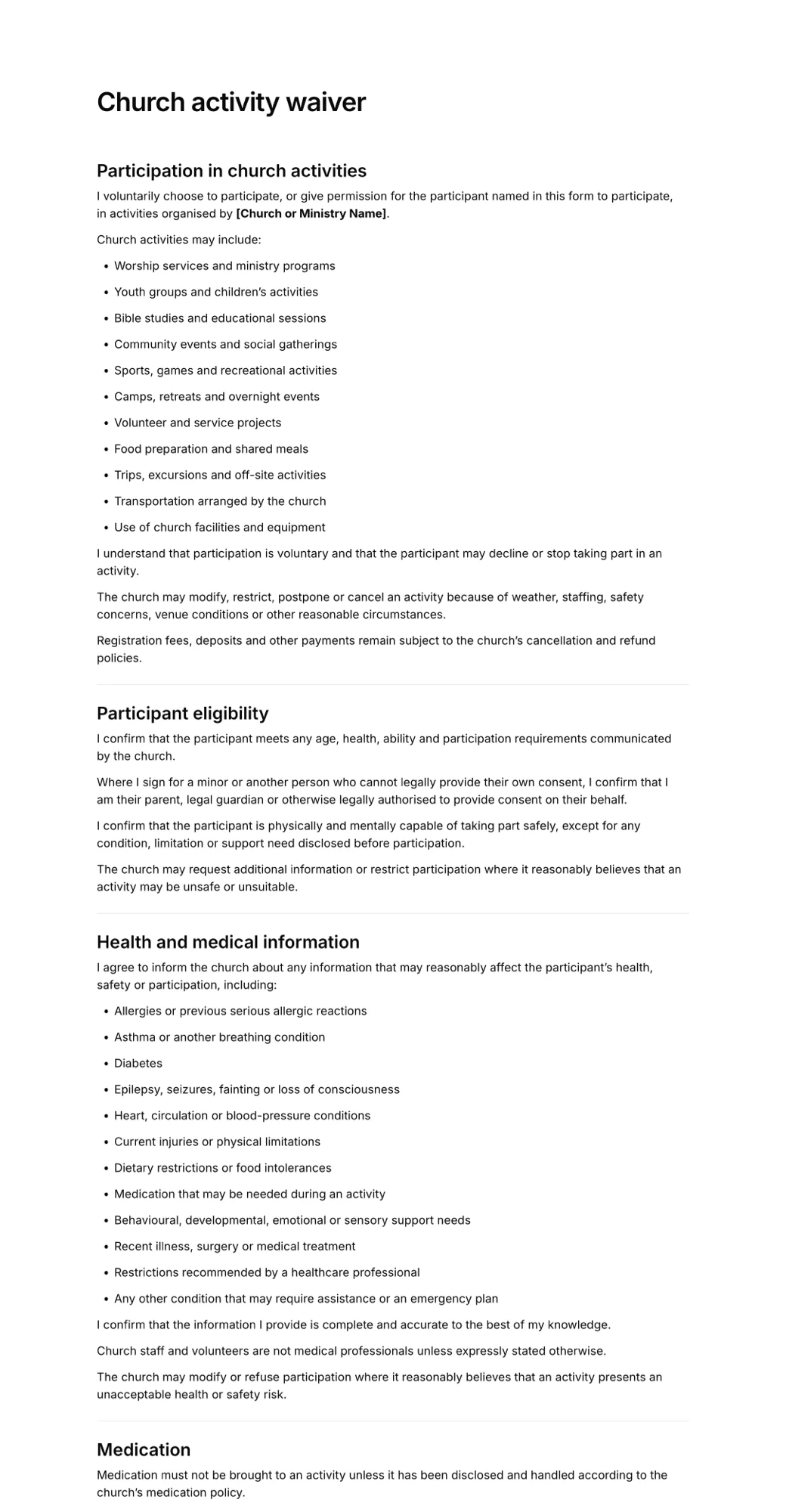
Add a guardian and minor section so the parent signs for each child, plus fields for emergency contacts, allergies and medical consent. Share the link in your church email or app, or print the QR code on a bulletin or sign-up table. Each signed form is stored in your Signatures list with the answers and the exact wording agreed to, searchable by name and downloadable as a PDF.
Best for: Churches that already have a church management system and need signed permission slips, waivers and consent forms.
Pricing: Free plan forever with 1 active form and 10 signatures per month. Pro is $15/month, or $10/month billed yearly ($120/year), with unlimited signatures at any volume.
Strengths:
- Real signature field, plus checkboxes, dates, multiple choice and contact blocks
- Guardian and minor sections for parent signatures
- Church templates including membership, prayer requests and event registration
- Kiosk mode on any tablet browser for sign-in tables
- Flat price, so a big summer of youth events costs the same
Drawbacks:
- Not a church management system: no member directory, giving, groups or check-in
- No payments, so trip fees must be collected elsewhere
- No file upload or conditional logic
- No integrations, so signed forms don't sync to member profiles
- Needs an internet connection, and no HIPAA BAA for detailed health records
2. Planning Center
Planning Center is a modular church management system where you pay only for the products you use. Its People product is free, and the pricing page says unlimited people, lists, workflows and forms are included at no cost. That makes it one of the best free options for connection cards, membership forms and ministry sign-ups, with answers saved to each person's profile.
Paid products include Registrations, Check-Ins, Groups and Giving. For signed forms, we found no built-in signature field. Registrations can attach People forms or PDF and external forms that require a signature, but those must be marked complete manually, and churches often use a "type your name" checkbox as a workaround.
Best for: Churches that want free forms tied to a member database and only pay for the modules they need.
Pricing: People, including forms, is free. Registrations, Check-Ins, Groups and Giving each start at $15/month and go up to $239/month based on size, as listed in November 2026. Calendar is free.
Strengths:
- Free unlimited forms in People
- Answers land in member profiles and lists
- Pay per module instead of one large bundle
- Lists and workflows included free
Drawbacks:
- No native signature field that we could find
- Signed PDFs mean uploads and manual tracking
- Costs add up if you need several paid modules
3. Breeze
Breeze is a church management system aimed at small churches that want something simple. Breeze now belongs to Tithely, and its site says "Breeze is now Tithely." Forms, events, check-in and name tags are included in one flat price, which isn't tied to how many contacts you have.
Breeze's own help article says there is not an official digital signature field and offers workarounds. Breeze forms also can't host a PDF for people to download.
Best for: Small and mid-size churches that want a simple system at a flat monthly price.
Pricing: $72/month flat for church management with free giving, with no contract, as listed in November 2026. A bundle with Worship Tools, App and Sites is $119/month. There's a 30-day free trial.
Strengths:
- One flat price regardless of congregation size
- Forms, events and check-in included
- No contract required
Drawbacks:
- No official signature field, per Breeze's help docs
- Forms can't host a downloadable PDF
- Now part of Tithely, so check which product and plan you're signing up for
4. Tithely
Tithely started as a giving platform and now offers church management with forms, event registration and kids and event check-in with guardian matching and allergy labels. If your church already gives through Tithely, adding church management keeps everything with one vendor.
Tithely's support article "Getting a Signature on a Form" says there is no built-in digital signature and suggests simulating one with checkbox, text or file fields.
Best for: Churches already using Tithely for online giving.
Pricing: Giving is free apart from processing fees (2.9% + $0.30 per card payment). All-Access is $119/month with a 30-day free trial, as listed in November 2026. The pricing page shows conflicting figures for the Church Management plan on its own, so check the vendor's pricing page.
Strengths:
- Giving, forms, events and check-in in one place
- Kids check-in with guardian matching and allergy labels
- Free giving tier to start
Drawbacks:
- No built-in signature field, per Tithely's support docs
- Plan pricing is confusing on the vendor's own page
5. ChurchTrac
ChurchTrac is an all-in-one church management system aimed at smaller churches. It includes event registration with custom form questions, Connect Form Cards for visitors, and check-in. We found no evidence of a signature field.
Best for: Smaller churches looking for an affordable all-in-one system.
Pricing: Check the vendor's pricing page. We couldn't load it to confirm current plans, and third-party listings disagree.
Strengths:
- Event registration and connection cards built in
- Check-in included
- Aimed at smaller church budgets
Drawbacks:
- No signature field that we could find
- Pricing could not be confirmed
6. Realm
Realm, from ACS Technologies, is a church management system with events, check-in and custom forms. Its plans, Inform, Connect and Multiply, are sold by quote. Its strength is the wider ACS ecosystem, including accounting and background checks, which matters more to larger churches.
Best for: Mid-size and large churches that want church management alongside accounting and background checks.
Pricing: Pricing on request.
Strengths:
- Events, check-in and custom forms
- Accounting and background checks in the same ecosystem
- Built for larger staff teams
Drawbacks:
- No published prices
- We couldn't confirm a signature field
7. Pushpay ChurchStaq
Church Community Builder is now part of Pushpay's ChurchStaq, and its old pricing page redirects to Pushpay. The plans list forms for events and registrations, check-in and facility management. Pushpay also runs a grant program for qualified church plants.
Best for: Larger, multi-campus churches.
Pricing: Pricing on request. The Complete plan is priced per campus.
Strengths:
- Forms, check-in and facility management
- Designed for multiple campuses
- Grant program for qualified church plants
Drawbacks:
- No published prices
- We couldn't confirm a signature field on the vendor's own pages
8. Jotform
Jotform is a general form builder with a native signature field and a large template library. It's a flexible way to add signed forms to any church, with conditional logic, file uploads and payment fields that AgreeDock doesn't have. It isn't built for churches, so you'll set up your own forms and records.
Best for: Churches that want custom forms with logic, uploads or payments, and are comfortable building forms themselves.
Pricing: Free Starter plan with 5 forms, 100 submissions and 10 signed documents per month, with Jotform branding. Bronze is $34/month billed annually ($39 monthly), as listed in November 2026. Nonprofits get 50% off paid plans.
Strengths:
- Native signature field
- Conditional logic, file uploads and payments
- 50% nonprofit discount
Drawbacks:
- Not church-specific, so more setup
- Free plan limited to 10 signed documents per month
- Higher tiers are needed for higher volumes, and HIPAA features are only on Gold
How to choose church forms software
Start with your database. If you don't have church management software yet, decide on that first. Planning Center's free People product is a low-risk start. Breeze and Tithely suit churches that prefer one flat price. Larger churches will want quotes from Realm and Pushpay.
Separate information from agreement. Use your church management system for connection cards, membership forms and prayer requests. Use a signing tool for anything a parent or participant must sign, such as permission slips, waivers and medical consent.
By budget. A free church database plus AgreeDock's free plan covers a small church with occasional signed forms. If you run many youth events, a flat plan with unlimited signatures avoids counting forms.
By minors. Children's and youth ministry forms need the parent to sign for the child. Check that the tool records the child's name, the parent's name and relationship, and the signature. Our guide to waivers for minors covers the details.
By health data. Basic allergy questions and emergency treatment consent are common on church forms. If you collect detailed medical histories, check which privacy rules apply to your church before choosing a tool.
By location. Retreat centers and camps often have poor signal. Collect signed forms before you leave, since AgreeDock and most online tools need a connection.
Which church consent forms need a signature?
Not every church form needs one. These usually do:
- Activity and trip waivers for youth retreats, sports, mission trips and outdoor events
- Permission slips for minors attending off-site events or traveling with leaders
- Medical consent allowing leaders to seek emergency treatment for a child
- Photo and video consent for church media and social channels
- Volunteer agreements for children's ministry and other roles
Membership forms often end with a signature too. See our church membership form guide for what to ask, and browse every church template.
Frequently asked questions
What is the best church forms software?
For general forms tied to a member database, Planning Center is a strong free starting point, while Breeze and Tithely offer flat-priced all-in-one systems. For forms that need a real signature, such as permission slips and waivers, many churches add a signing tool like AgreeDock or Jotform.
Does Planning Center have a signature field?
We found no built-in signature field. Planning Center's help documentation describes attaching PDF or external forms that require a signature, which must be marked complete manually. Many churches use a typed-name checkbox or a separate signing tool instead.
Can Breeze or Tithely collect signatures on forms?
Both vendors' help articles, titled "Getting a Signature on a Form", say there is no official or built-in digital signature field. They suggest workarounds such as checkboxes, text fields or file uploads.
How do I make a church permission slip online?
Start from a church activity waiver or permission slip template, add the event details, a guardian and minor section, emergency contacts and medical consent, then share the link or QR code with parents before the event.
What should a church consent form include?
Include the child's and parent's names, the event or activity, dates and location, transportation details, emergency contacts, allergies and medications, consent to emergency treatment, photo consent if needed, and the parent's signature and date.
Is there free church forms software?
Yes. Planning Center People includes unlimited forms for free, Jotform has a free plan with 10 signed documents a month, and AgreeDock's free plan includes 1 active form and 10 signatures a month.
Can parents sign church forms on their phone?
Yes. Online forms can be shared by link or QR code, and parents can sign on a phone, tablet or computer. Collect them before trips, since most online tools need an internet connection.