The best AI waiver generator is one that turns a description of your business into a waiver you can edit, share and collect signatures on in the same place. AgreeDock and Jotform's AI Waiver Generator both do that, and both have free plans. ChatGPT and other general AI assistants can draft waiver text well, but you then need a separate tool to collect signatures and keep records. Whichever you use, treat the output as a first draft and have it reviewed for where you operate.
This guide is for business owners who want a liability waiver quickly and are wondering whether an AI liability waiver is good enough. AgreeDock is our product, so we've included it, and we've tried to be straight about where other tools fit better. Prices were checked on vendor websites in November 2026 and can change. Our comparison is based on vendor sites and public documentation. Where a vendor advertises an AI generator but we couldn't confirm the details, we say so.
Quick comparison
| Tool | Best for | Collects signatures | Free to try |
|---|---|---|---|
| AgreeDock | Draft, edit and sign in one place | Yes, link, QR and kiosk | Yes, free plan |
| Jotform AI Waiver Generator | Teams already using Jotform | Yes, via Jotform Sign | Yes, free plan |
| ChatGPT and general AI | Drafting and rewriting text | No | Check the vendor |
| pdfFiller | PDF-based waivers | Check the vendor | Check the vendor |
| Waiver Electronic | Budget waiver app with AI | Yes | 15-day trial |
| Makeform | Niche waiver form generators | Check the vendor | Check the vendor |
How we chose
An AI waiver template is only useful if it gets you closer to a signed, enforceable waiver. We looked at:
- Input. Does the generator ask about your activity, participants and location, or just produce a generic disclaimer?
- Editing. Can you change every clause before publishing?
- Signing. Can customers sign the result by link, QR code or tablet, or do you have to copy it somewhere else?
- Records. Is each signed waiver stored with the wording the person agreed to?
- Honesty. Does the vendor say clearly that the output is not legal advice?
We also found WaiverTrail described as AI-powered on Product Hunt, but too little public detail to review it fairly. We found no AI waiver drafting on WaiverForever's pricing page.
1. AgreeDock AI waiver generator
AgreeDock's AI waiver generator drafts a waiver from a description of your business. You describe what customers do, where, and who takes part, and it creates a draft form with waiver wording and fields. You then edit it in the same editor as our 100+ templates, adding signature, checkbox, text, date, multiple choice and contact fields, plus a guardian section if minors take part.
When it's ready, you share it by link or QR code or open it in kiosk mode on a tablet. Every signed waiver is saved with the person's answers and the exact wording they agreed to, and you can download each as a PDF.
Best for: Small businesses that want to go from description to signed waivers in one tool.
Pricing: Free plan with 1 active form and 10 signatures per month. Pro is $15/month, or $10/month billed yearly ($120/year), with unlimited signatures.
Strengths:
- Draft, edit, share and store in one place
- Output is a normal, fully editable form
- Link, QR and kiosk signing on every plan
- Stores the exact wording each person signed
Drawbacks:
- Like every AI tool, the draft needs your review and, ideally, a lawyer's
- No offline signing or native mobile app
- No conditional logic, file uploads, payments or integrations
- No HIPAA BAA, so check which rules apply if you collect health data
2. Jotform AI Waiver Generator
Jotform's AI Waiver Generator builds a waiver form from your activity, participants and location. Generating is free on Jotform's free plan, and the output opens in Jotform's Form Builder for editing. Participants sign through Jotform Sign. Jotform's page states that the generator does not provide legal advice.
Best for: Businesses already using Jotform for other forms.
Pricing: Free to generate on the Starter plan, which includes 10 signed documents per month. Bronze starts at $34/month (billed annually), as listed in November 2026.
Strengths:
- Asks for activity, participants and location
- Output is editable in a full form builder
- Free plan to try it end to end
Drawbacks:
- Signed document caps on each plan
- Free plan shows Jotform branding
- Generic form builder, so waiver-specific record keeping depends on how you set it up
3. ChatGPT and other general AI assistants
General AI assistants such as ChatGPT can write a solid first draft of waiver text if you give them a detailed prompt. They're also useful for rewriting dense legal wording into plain English, or for listing risks you might have missed.
The limitation is everything after the text. A chatbot doesn't collect signatures, store records or show you who signed which version. You'll need to paste the draft into a signing tool, and you're responsible for checking every clause.
Best for: Drafting or rewriting wording before you paste it into a waiver tool.
Pricing: Check the vendor's pricing page.
Strengths:
- Flexible, conversational drafting
- Good at plain-language rewrites
- Can explain what each clause is for
Drawbacks:
- No signatures, storage or audit trail
- May produce confident but wrong legal statements
- Doesn't know your local law unless you tell it, and may still get it wrong
4. pdfFiller AI waiver generator
pdfFiller, a PDF editing and signing tool, has AI waiver generator pages. Its pages carry a disclaimer that the AI doesn't guarantee legal accuracy, which is the right message for any tool in this list.
Best for: Businesses that prefer working with PDF documents.
Pricing: Check the vendor's pricing page.
Strengths:
- PDF-based workflow if you like fillable documents
- Clear disclaimer about legal accuracy
Drawbacks:
- We couldn't confirm how the generator works in detail from public pages
- PDF waivers can be harder to complete on a phone than a web form
5. Waiver Electronic
Waiver Electronic is a low-cost waiver app with iOS and Android apps, kiosk and offline modes, and QR, SMS and email sharing. It markets the ability to create waivers in seconds with AI. That's a vendor claim we haven't been able to examine in detail.
Best for: Budget-conscious studios that want a waiver app with offline mode.
Pricing: 15-day free trial. Basic is $11.99/month for the first year, then $14.99/month, for 70 waivers per month, as listed in November 2026.
Strengths:
- Full waiver app, not just a generator
- Offline and kiosk modes
- Native iOS and Android apps
Drawbacks:
- AI drafting details not documented publicly in depth
- Promo pricing rises in year two
- Basic plan capped at 70 waivers per month
6. Makeform
Makeform offers niche AI generators for specific waiver forms, such as youth venture waivers, and labels the feature as beta. It's worth a look if one of its generators matches your activity closely.
Best for: Trying an activity-specific AI waiver form.
Pricing: Check the vendor's pricing page.
Strengths:
- Activity-specific generators
Drawbacks:
- Beta feature
- Limited public detail on signing and record keeping
How to prompt for a good AI waiver
The quality of an AI waiver depends almost entirely on what you tell it. A one-line prompt like "write a gym waiver" gets you a generic disclaimer. Instead, include:
- Your business and location. Name, type of business, and the state or country where you operate.
- The exact activities. "Guided sea kayak tours of 2 to 4 hours in open water", not "water sports".
- Equipment and premises. What customers use and where: rented bikes, climbing walls, saunas, trampolines.
- Specific risks. Capsizing, cold water, falls from height, collisions with other jumpers, allergic reactions.
- Who takes part. Minimum age, whether minors join with a parent, and any fitness or health requirements.
- Rules customers must follow. Safety briefings, required gear, alcohol rules, instructor instructions.
- What else you need. Medical treatment consent, photo consent as a separate checkbox, emergency contacts.
- Tone. Ask for plain English, short sections and a clear heading for the release.
For example: "Write a liability waiver for a kayak rental business in Oregon. Customers aged 16 and over rent single and double kayaks for up to 4 hours on a lake. Under 18s need a parent to sign. Include capsizing, cold water, weather changes, collisions and equipment failure. Customers must wear a life jacket and stay within marked areas. Add medical treatment consent and a separate optional photo consent checkbox. Use plain English."
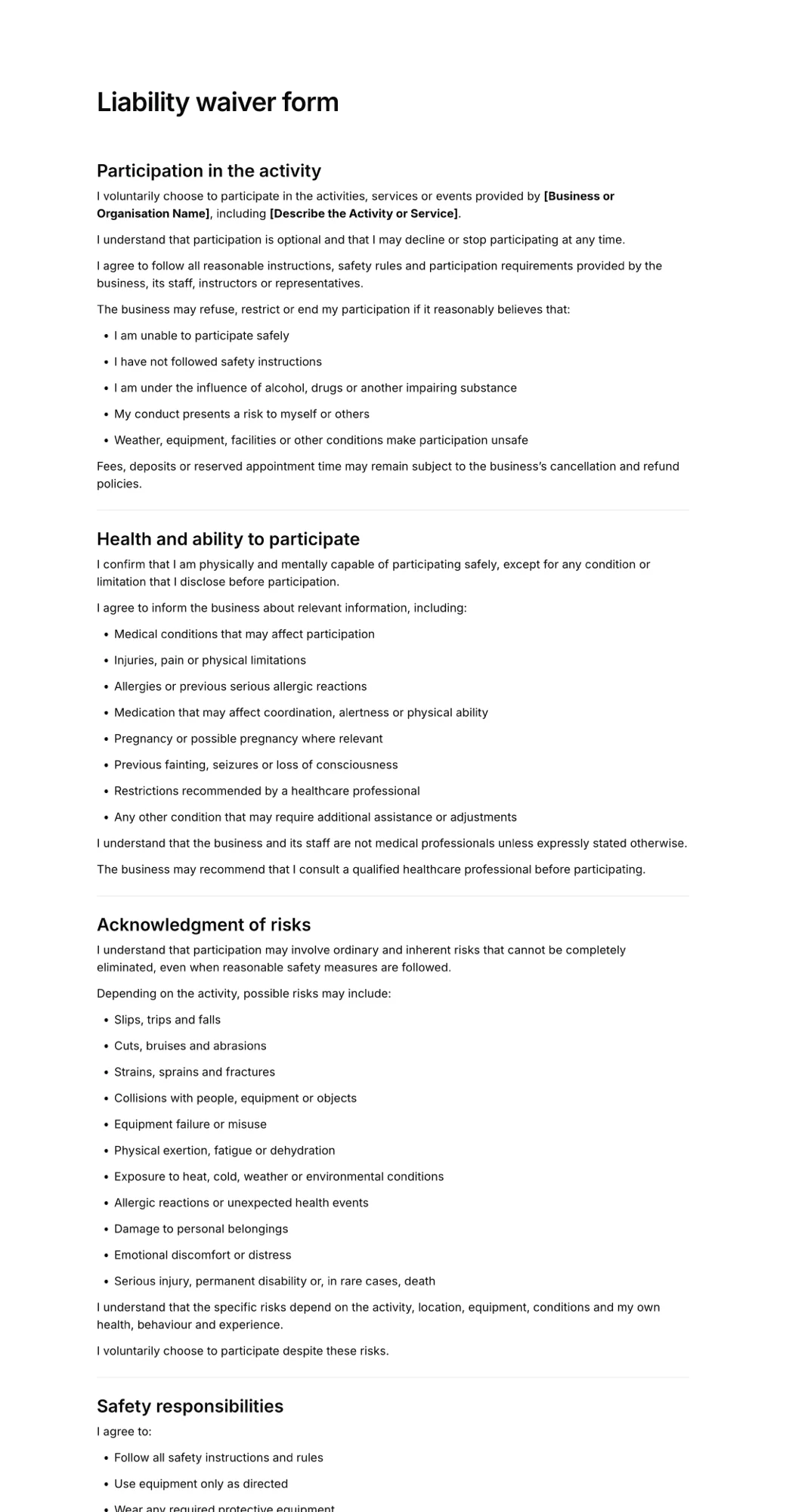
Start from a solid structure too. Our liability waiver form template shows the sections most waivers include.
What AI waiver generators get wrong
AI drafts look professional, which makes their mistakes easy to miss. Watch for these:
- Jurisdiction. Waiver rules vary by state and country. Some places limit waivers heavily, some restrict what a parent can waive for a child, and some require specific wording or formatting. AI often writes as if one set of rules applies everywhere.
- Generic risks. A waiver that lists "injury, illness or death" without naming your actual risks may be weaker than one that describes them. AI fills gaps with boilerplate.
- Gross negligence and intentional harm. Many courts won't enforce a release of gross negligence or intentional misconduct. AI drafts sometimes claim to release "all claims of any kind", which can hurt the whole document.
- Overreach. Clauses that release claims the law won't let you waive, or that are buried in small print, can make a court less willing to enforce the rest.
- Minors. A draft written for adults won't handle a parent signing for a child unless you ask.
- Missing pieces. Medical consent, emergency contacts, photo consent and severability clauses are easy for AI to leave out.
- Invented law. AI can cite statutes or cases that don't exist or don't say what it claims. Don't keep legal citations you can't verify.
Our guide to what makes a liability waiver invalid explains these problems in more detail.
Should a lawyer review an AI waiver?
Yes, if you can. An AI generator gets you a structured draft in minutes, which saves a lawyer time and you money. But it doesn't know your insurance requirements, your incident history or how courts in your area treat waivers. A local attorney can review the draft once, and you can reuse it for every customer after that.
At a minimum, read every clause yourself, check it matches what customers actually do, and update the waiver when you add activities, equipment or locations. None of this guide is legal advice.
How to choose an AI waiver generator
- Signing in the same tool. If you want to go straight from draft to signatures, pick a generator built into a signing tool, such as AgreeDock or Jotform. If you just want text, a general AI assistant is enough.
- By volume. For a few waivers a month, free plans work. For hundreds, compare the price at your real monthly count, including caps.
- Kiosk vs remote. Check whether customers can sign on a front-desk tablet as well as their own phone.
- Offline. If your venue lacks reliable internet, look for a tool with native offline apps. AgreeDock needs a connection, so check offline support with any vendor you consider.
- Minors. Make sure you can add a guardian section with the child's details and a parent's signature.
- Health data. If your waiver asks medical questions, check which privacy rules apply to you.
- Templates as backup. If an AI draft feels off, start from a template for your industry in our templates library instead.
Frequently asked questions
Can AI write a liability waiver?
Yes. AI waiver generators and general assistants like ChatGPT can draft a structured liability waiver from a description of your activity. The draft still needs your review and, ideally, a lawyer's, because AI doesn't know your local law or your specific risks.
Are AI-generated waivers legally binding?
A waiver isn't more or less valid because AI wrote it. What matters is the wording, how clearly it's presented, how it's signed and the law where you operate. AI drafts often include generic or overreaching clauses, so have one reviewed before relying on it.
What is the best free AI waiver generator?
AgreeDock and Jotform both let you generate a waiver with AI on a free plan and collect signatures on it. AgreeDock's free plan includes 10 signatures per month, and Jotform's Starter plan includes 10 signed documents per month.
Can I use ChatGPT to make a waiver?
You can use ChatGPT to draft waiver text, but it won't collect signatures or store signed records. Paste the reviewed text into a waiver tool that lets customers sign by link, QR code or tablet and keeps each signed copy.
What should I include in an AI waiver prompt?
Include your business type and location, the exact activities, equipment, specific risks, participant ages, rules customers must follow, and any extra sections such as medical consent, photo consent or a parent signature for minors. Ask for plain English.
Can a waiver release a business from gross negligence?
In many places, no. Courts often refuse to enforce a release of gross negligence or intentional harm. AI drafts sometimes include this kind of wording anyway, so check it with a lawyer where you operate.
Do I still need a lawyer if I use an AI waiver template?
It's strongly recommended. An AI draft gives a lawyer a head start and can reduce the cost of review, but only a local attorney can check it against your state or country's rules and your insurance requirements.