The best yoga studio waiver software depends on how you take bookings. If you already use a studio platform such as Momence, Arketa, WellnessLiving or Mindbody, start with its built-in waiver. If you teach independently, take bookings by message or a simple calendar, or want a more detailed waiver than a checkbox, a standalone yoga waiver app such as AgreeDock (free plan, flat-price Pro) or WaiverForever (free plan, Mindbody integration) is cheaper and quicker to set up.
This guide is for yoga studio owners, pilates studios comparing studio software for waivers, independent instructors and teachers who run retreats or outdoor classes. AgreeDock is our product, so we've included it, and we've tried to be straight about where other tools fit better. Prices were checked on vendor websites in November 2026 (Smartwaiver in October 2026) and can change, so confirm them before you buy. Our comparison is based on vendor sites and public documentation.
Quick comparison
| Tool | Type | Best for | Starting price |
|---|---|---|---|
| AgreeDock | Standalone waivers | Instructors and studios needing waivers only | Free; Pro $15/mo |
| Momence | Studio platform | Boutique studios and creators | Quote based |
| Arketa | Studio platform | Solo instructors and boutique studios | From $49/mo |
| WellnessLiving | Studio platform | One system for everything | From $62/mo (annual) |
| Mindbody | Studio platform | Established multi-service studios | Check vendor pricing page |
| WaiverForever | Standalone waivers | Mindbody studios, low volume | Free; Essential $19/mo |
| Waiver Master | Standalone waivers | Budget studios on Mindbody or Square | From $9.99/mo |
| Waiver Electronic | Standalone waivers | Small budget studios | From $11.99/mo |
| Smartwaiver | Standalone waivers | Busy studios needing offline kiosks | From $22/mo |
How we chose
A yoga or pilates waiver is usually signed once, before a student's first class, and stays on file. The student often books online, then turns up a few minutes before class. So we looked at:
- Signing before the first class. Can the waiver be signed when the student books, or from a link you send ahead?
- Health questions. Can you ask about injuries, pregnancy and conditions a teacher should know about?
- Hands-on adjustments. Can students give or decline consent to physical assists?
- Price for a small studio. Many studios see a few dozen new students a month, so a free or low-cost plan matters.
- Finding records. Can you look up a student's signed waiver by name?
- Fit with booking. Does it live inside the booking platform you already pay for?
1. AgreeDock
AgreeDock is a standalone yoga waiver app. You start from the yoga liability waiver template, the pilates studio liability waiver template, or the AI waiver generator, then share it by link or QR code. Students can sign from the link in your booking confirmation, or on a tablet at the studio entrance in kiosk mode. Each signed waiver is saved with the student's answers and the exact wording they agreed to, searchable by name and downloadable as a PDF.
The editor covers what most studios need: risk acknowledgment checkboxes, a long text field for injuries and conditions, a multiple choice question for hands-on adjustment consent, and contact details with an emergency contact.
Best for: Independent instructors and studios that take bookings elsewhere and want a proper waiver without a full studio platform.
Pricing: Free plan with 1 active form and 10 signatures per month. Pro is $15/month, or $10/month billed yearly ($120/year), with unlimited signatures.
Strengths:
- Free plan that covers a small teacher's first students
- Unlimited signatures on Pro at a flat price
- Yoga, pilates and intake templates ready to edit
- Link, QR code and kiosk signing on every plan
Drawbacks:
- No class booking, payments or memberships
- No integrations with Momence, Mindbody or other studio software
- No conditional logic, so every student sees every question
- No offline signing or native app (it runs in the browser)
- No HIPAA BAA, so check which rules apply if you collect health details
2. Momence
Momence is booking, payments and marketing software for yoga, pilates and wellness studios and creators. Its help center describes default and custom waivers, set up under Settings, and child waivers signed by a parent. Students sign as part of booking, so the waiver is on file before they arrive.
Best for: Boutique studios and teachers running classes, workshops and online content.
Pricing: Quote based. The pricing page says Momence will put together pricing that fits your studio. There's a free trial link, but the length isn't stated.
Strengths:
- Waiver signed during booking
- Custom waivers and parent-signed child waivers
- Booking, payments and marketing in one place
Drawbacks:
- No public pricing
- More than you need for waivers alone
3. Arketa
Arketa is studio software for boutique fitness and wellness, covering booking, a branded app and video. Both its Individual and Studio plans include a digitally stored liability waiver. The pricing page doesn't describe the e-signature details, so ask what the waiver flow looks like before you commit.
Best for: Solo instructors on the Individual plan, and boutique studios.
Pricing: Individual is $49/month billed annually, as listed in November 2026, with monthly billing also available and a 3% transaction fee plus Stripe fees. Studio plans are custom quotes on annual renewal. Individual has a free trial.
Strengths:
- Waiver included on Individual and Studio plans
- Video and on-demand classes in the same platform
Drawbacks:
- 3% transaction fee on the Individual plan
- Studio pricing is quote only
4. WellnessLiving
WellnessLiving is an all-in-one suite for fitness, spa and wellness businesses. It offers digital waivers and contracts that clients sign with a mouse, signature pad or finger. The pricing page doesn't make clear which plan includes waivers.
Best for: Studios that want one system for booking, payments, marketing and waivers.
Pricing: Starter is $69/month billed monthly or $62/month billed annually, and Business is $199/month or $179/month annually, as listed in November 2026. Website setup, migration and onboarding are free.
Strengths:
- Published pricing
- Waivers signed on screen, signature pad or phone
- Free onboarding and migration
Drawbacks:
- Waiver tier not confirmed on the pricing page
- A full suite, so a lot to learn if you only need waivers
5. Mindbody
Mindbody is a large booking, payments and marketing suite and still common in yoga and pilates. Based on its public documentation, it includes a configurable liability waiver that clients accept when creating an account, stored on the client profile. It's a click-to-agree step rather than a full waiver form, which is why many Mindbody studios add a dedicated waiver app through an integration with tools such as Smartwaiver or WaiverForever.
Best for: Established studios that want marketplace exposure.
Pricing: Sales led. Check the vendor's pricing page.
Strengths:
- Waiver acceptance built into sign-up
- Integrations with dedicated waiver apps
Drawbacks:
- Expensive if you only need waivers
- Limited waiver layout compared with a waiver tool
6. WaiverForever
WaiverForever is a standalone waiver platform with native iOS, Android and Amazon kiosk apps, offline signing and age validation. It integrates with Mindbody, Square and Shopify, plus Zapier, so it's a common add-on for studios that want a fuller waiver than their booking system provides.
Best for: Mindbody studios, and small studios that fit within a free plan.
Pricing: Free plan with 20 submissions per month. Essential is $19/month with 50 submissions included, then metered per waiver, as listed in November 2026. Conditional logic starts on Standard at $39/month.
Strengths:
- Free plan with the native app included
- Mindbody integration
- Offline signing
Drawbacks:
- Metered pricing makes total cost harder to predict
- Conditional logic and API need Standard or above
7. Waiver Master
Waiver Master is a low-cost cloud waiver tool with a free iPad and Android kiosk app. It integrates with Mindbody, Booker, ClubReady, Clover and Square, though integrations are a paid add-on.
Best for: Studios on Mindbody, Clover or Square with a tight budget.
Pricing: WM 100 is $9.99/month for 100 submissions per month, and WM 250 is $14.99/month, as listed in November 2026. Integrations cost $10 to $20 per location per month. Free trial with 30 submissions.
Strengths:
- Low entry price
- Free kiosk app
- Studio software integrations
Drawbacks:
- Integrations and form setup cost extra
- Offline mode not confirmed on its site
8. Waiver Electronic
Waiver Electronic is a budget waiver app with iOS and Android apps, kiosk and offline modes, conditional logic and sharing by QR code, SMS or email. It also lists a Mindbody integration and card payments through Stripe, Square or PayPal.
Best for: Small studios that want an app with offline mode at a low price.
Pricing: Basic is $11.99/month for the first year, then $14.99/month, for 70 waivers per month, as listed in November 2026. 15-day free trial.
Strengths:
- Offline and kiosk modes
- Conditional logic on the entry plan
- Unlimited devices and templates
Drawbacks:
- 70 waivers per month on Basic is low for a busy studio
- Promo price rises in year two
9. Smartwaiver
Smartwaiver is one of the best-known dedicated waiver platforms. It offers native iOS and Android apps with offline collection, driver's license scanning, automatic photo capture, and an open API with integrations, including Mindbody.
Best for: Busy studios and multi-location brands that need offline kiosks or integrations.
Pricing: Free trial, no free plan. Basic is $22/month for 100 waivers per month and Starter is $60/month for 300, as listed in October 2026.
Strengths:
- Native kiosk apps with offline collection
- Photo capture and API
Drawbacks:
- Price rises with waiver volume
- No free plan
See our Smartwaiver alternative page for a side-by-side with AgreeDock.
All-in-one yoga and pilates studio software vs standalone waiver app
Most yoga and pilates studio software now includes a waiver. Whether you should rely on it depends on two things: whether you already pay for the platform, and how much the waiver needs to say.
Use your studio platform's waiver if:
- You already run bookings and payments through Momence, Arketa, WellnessLiving or Mindbody
- A single waiver acceptance at sign-up covers what you need
- You want the waiver status visible on each student's profile
Use a standalone waiver app if:
- You teach independently and take bookings by message, a calendar link or a community platform
- You want separate acknowledgments, health questions, adjustment consent and a guardian signature, not one checkbox
- You run retreats, outdoor classes or workshops at other venues and need a QR code students can scan on arrival
- A full studio platform costs more than your class income justifies
Many studios do both: the platform handles booking, and a dedicated waiver or intake form collects the detail. The trade-off is that without an integration you check two places. WaiverForever, Waiver Master, Waiver Electronic and Smartwaiver list Mindbody integrations. AgreeDock doesn't integrate with booking tools, so staff search the Signatures list by name.
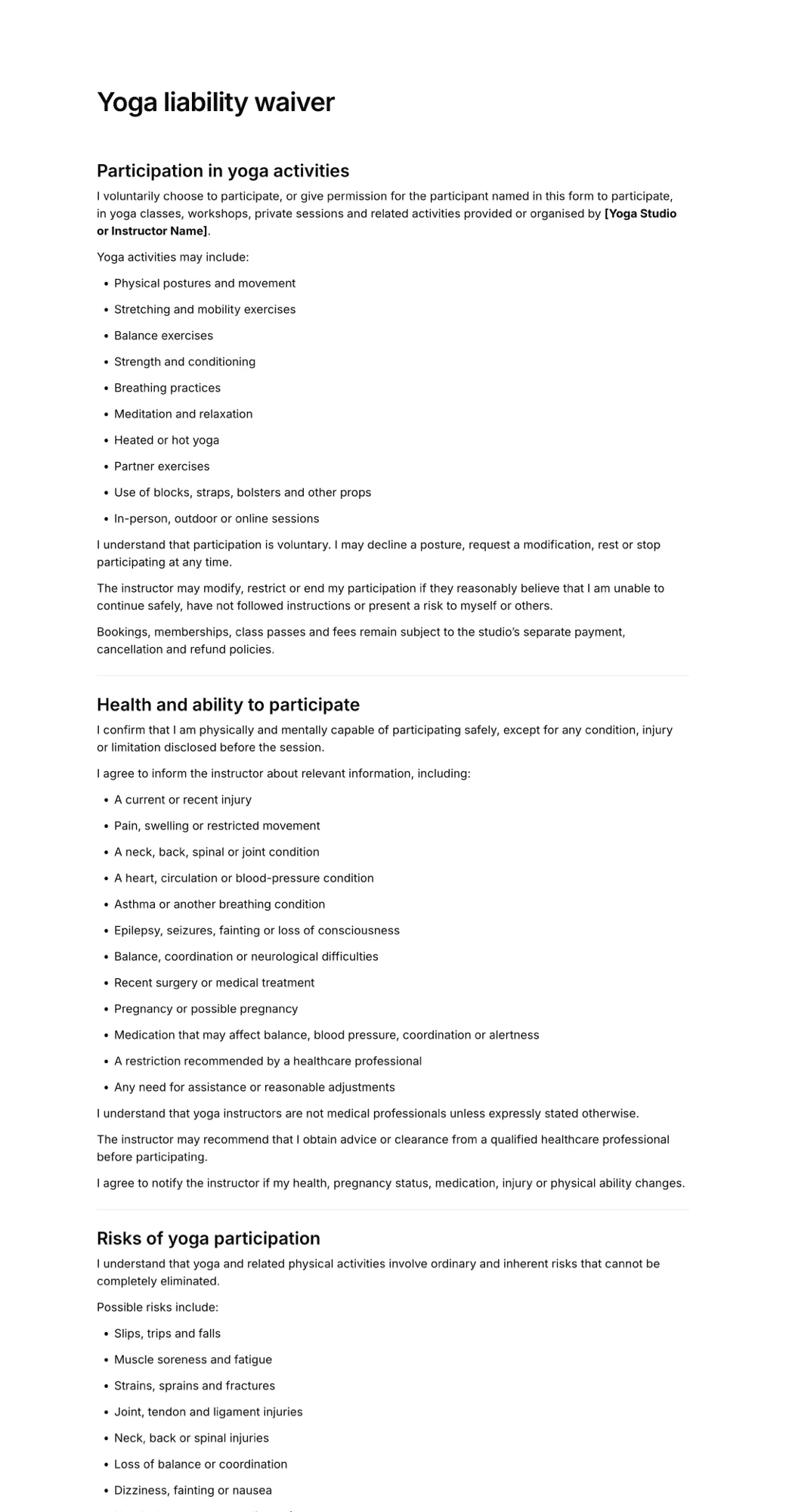
What a yoga waiver should cover
Whatever software you use, the form matters more than the tool. A yoga or pilates waiver usually includes:
- the classes covered, such as hot yoga, aerial, reformer, prenatal or outdoor sessions
- specific risks: strains, falls, overheating, equipment such as reformers or props
- a health disclosure and a promise to tell the teacher about changes
- consent, or refusal, of hands-on adjustments
- pregnancy and post-surgery guidance to check with a doctor
- a release of liability, to the extent local law allows
- signature and date, with a guardian signature for minors
Our guide to the yoga liability waiver walks through each clause. If you also want a detailed health history, keep it separate in a yoga intake form so the waiver stays short.
How to choose yoga waiver software
- By volume. A teacher with 5 new students a month fits a free plan. A studio with 200 new students a month should compare tier prices or pick flat pricing.
- Kiosk vs remote. Send the link when students book, and keep a tablet or QR code at the door for drop-ins. A waiver kiosk in kiosk mode lets students sign one after another.
- Budget. If you already pay for a studio platform, use its waiver before adding a tool. If you don't, a standalone app at $10 to $20 a month is far cheaper than a studio suite.
- Health data. Yoga and pilates waivers often ask about injuries and pregnancy. Ask only what teachers need, and check which privacy rules apply to you.
- Minors. Kids' and teen classes need a parent or guardian to sign.
- Offline. For outdoor or beach classes without reliable signal, choose an app with offline mode, such as WaiverForever, Waiver Electronic or Smartwaiver, or have students sign from home before class.
Frequently asked questions
What is the best waiver software for yoga studios?
If you already use Momence, Arketa, WellnessLiving or Mindbody, start with its built-in waiver. For a standalone yoga waiver app, AgreeDock offers a free plan and flat-price unlimited signatures on Pro, and WaiverForever offers a free plan with a Mindbody integration.
Is there a free yoga waiver app?
Yes. AgreeDock has a free plan with 1 active form and 10 signatures per month, and WaiverForever has a free plan with 20 submissions per month. Both work for independent teachers with a small number of new students.
Does Momence have waivers?
Yes. Momence's help center describes default and custom waivers, plus child waivers signed by a parent. Students sign them as part of booking.
Do pilates studios need a separate waiver?
A pilates waiver covers similar ground to a yoga waiver but should name reformer and apparatus risks. Many studios use one form that covers both mat and equipment classes, or a dedicated pilates studio waiver.
Should a yoga waiver include hands-on adjustment consent?
Many studios include it, so students can say whether they're comfortable with physical assists. Record it as a clear yes or no question, and remind teachers to check before adjusting anyone.
Can students sign a yoga waiver before their first class?
Yes. Send the waiver link in the booking confirmation or welcome email, or add it to your website. Students sign on their phone, and the signed waiver is waiting when they arrive.
What is the difference between a yoga waiver and a yoga intake form?
A waiver records that the student understands the risks and releases certain claims. An intake form collects background such as health history, experience and goals. Many studios use both, or combine short versions of each.