A bounce house waiver is the form a renter, event host or parent signs before an inflatable is set up or used. It explains the risks of inflatable play, confirms who is responsible for supervision, capacity limits and weather shutdowns, records damage and setup terms, and releases the rental company from certain claims arising from the ordinary risks of bouncing.
Bounce houses look harmless, which is part of the problem. Kids pile in above the posted limit, older children bounce with toddlers, adults climb in "just for a minute," and a gust of wind arrives before anyone checks the forecast. Sprains, head knocks, broken arms and collisions are the most common injuries, and wind-related incidents are the ones that make the news. A clear, signed waiver gives your rental business a record that the customer understood the rules and accepted responsibility for supervising the unit.
This guide covers what a bounce house waiver is, who should sign it, what to include, how rentals differ from venue play, how to handle children and party guests, a sample structure you can adapt, and how to collect waivers online. It is general information, not legal advice. Waiver rules differ between countries and states, and some states regulate inflatable amusement devices directly, so have your final waiver reviewed for where you operate.
What is a bounce house waiver?
A bounce house waiver, also called a bounce house rental agreement, inflatable rental waiver, moonwalk waiver or bouncy castle waiver, is a document in which the signer:
- confirms the rental date, delivery address and the units being rented
- acknowledges the physical risks of inflatable play
- agrees to provide adult supervision at all times while the unit is in use
- agrees to follow capacity, age, size and weather rules
- accepts responsibility for damage, misuse and the setup area
- consents to emergency medical treatment for participants where relevant
- releases the rental company from certain claims, to the extent permitted by law
- signs and dates the form
Most rental companies combine the waiver with the rental agreement, so the customer books, accepts the terms and signs the release in one step.
Who needs a bounce house waiver?
Any business or organization that puts people on inflatables should consider one:
- bounce house and party rental companies
- inflatable water slide and obstacle course rental businesses
- indoor inflatable parks and play centers
- family entertainment centers with inflatable zones
- schools, PTAs and churches hosting fun days and festivals
- camps and community events with rented inflatables
- event planners and corporate event organizers
- HOAs and apartment communities running resident events
Who should sign: renter, parent or both?
This is where bounce house waivers differ from most activity waivers.
- Backyard and event rentals. The renter or event host signs. They're the one controlling the unit after you leave, so the waiver focuses on supervision, rules, weather and damage. Many companies also ask the host to collect waivers from guests' parents, or give them a link to share.
- Staffed rentals. If your attendant stays on site, you control access, so collect waivers from participants or their parents as well as the host.
- Indoor inflatable parks. Every participant, or a parent for each child, signs before entry, the same way a trampoline park waiver works.
If you're not sure, collect the host's waiver for every booking and offer a participant waiver link for larger or public events.
Why bounce house companies need a waiver
A waiver doesn't replace proper anchoring, trained setup crews or insurance, but it does several useful jobs:
- Shows informed consent. It records that the customer was told about the risks and rules before the unit was used.
- Puts supervision in writing. The single biggest safety factor after setup is an adult watching the unit. The waiver makes that the renter's responsibility.
- Sets weather and capacity rules. Wind limits, rain shutdowns and maximum occupants are agreed in writing, not just printed on a sticker.
- Covers damage and misuse. Silly string, shoes, sharp objects, moving the unit or unplugging the blower all cost you money.
- Limits certain claims. Where local law allows, a well-written release can reduce exposure for ordinary injuries.
Courts in many places won't enforce a waiver against gross negligence, such as skipping stakes or sandbags, or delivering a unit with a known torn seam. For what can undermine a waiver, see what makes a liability waiver invalid.
What should a bounce house waiver include?
1. Renter and event details
Collect the renter's full name, phone, email, delivery address and event date and times. Add the event type (birthday, school event, church festival) and expected number of children, so you can confirm the right unit size.
2. Units and services covered
List every unit and add-on covered by the waiver:
- bounce houses and combo units
- inflatable slides, wet or dry
- obstacle courses and interactive games
- toddler units and soft play
- generators, blowers and extension cords
- tables, chairs, tents and concessions machines if you rent them
3. Specific risks
Generic wording like "play involves risk" is weaker than naming the risks. Common bounce house injuries include:
- sprains, strains and fractures from awkward landings
- head, neck and dental injuries from collisions between bouncers
- falls from entrances, exits, slides and walls
- injuries to smaller children bouncing with larger ones
- slips on wet surfaces on water slides and splash pools
- friction burns and scrapes
- heat illness and sunburn
- units shifting, deflating or becoming airborne in high winds
- tripping over stakes, cords or blower tubes
4. Adult supervision
State that a responsible adult must supervise the unit at all times while it's inflated and in use, and that the renter is responsible for appointing them. Spell out what the supervisor does: enforce capacity, separate age groups, keep the entrance clear and clear the unit if anything goes wrong.
5. Capacity, age and size rules
Set out the rules for each unit, matching the manufacturer's limits:
- maximum number of occupants at one time
- separate sessions for smaller and larger children
- no adults in units designed for children
- height or weight limits for slides and obstacle courses
- no flips, wrestling, climbing walls or hanging on netting
- no shoes, glasses, jewelry, sharp objects, food, drinks or gum
- no silly string, face paint or confetti inside the unit
6. Weather and shutdown rules
Wind is the biggest serious risk with inflatables. Include:
- a maximum wind speed above which the unit must be cleared and deflated (use the manufacturer's limit, often around 15 to 20 mph)
- clearing and deflating the unit during rain, lightning or storms
- not re-inflating after a storm until the anchoring has been checked
- your cancellation and rescheduling policy for bad weather
7. Setup, anchoring and power
Confirm that only your crew sets up, moves or anchors the unit, and that the renter won't remove stakes or sandbags. Note that the blower must stay running while the unit is occupied, and who supplies power or a generator. Ask the renter to confirm the setup area is clear of sprinkler heads, buried lines, pools and overhead wires.
8. Damage, cleaning and deposit
State who pays for damage beyond normal wear, cleaning fees for mud, food or bodily fluids, and how deposits and cancellations work. Our equipment rental agreement guide covers damage and deposit terms in more detail.
9. Participant health and medical consent
For staffed events and indoor parks, ask parents about conditions that matter for vigorous play, such as recent injuries, heart conditions or seizures, and authorize staff to give first aid and call emergency services. For unattended backyard rentals, a statement that the renter will keep children with relevant conditions off the unit is usually enough.
10. Photo and video consent
If you post photos of your setups on social media, ask for consent as a separate checkbox. Our photo consent form template covers this in more detail.
11. Release of liability and indemnity
The release states which claims the signer gives up, to the extent permitted by law. Many rental companies also ask the renter to indemnify the company for claims made by guests, since the renter controls who uses the unit. Keep the wording clear, visible and in plain language. Our release of liability form guide explains how release wording works.
12. Signature and date
Collect the renter's signature, plus a parent or guardian's for any participant under 18, with the date. An electronic signature with a timestamp is far easier to find than a carbon copy left in the delivery van.
Backyard rentals vs inflatable venues
Different setups bring different risks, so match the waiver to how you operate.
- Backyard and private party rentals. You leave after setup. Focus on supervision, capacity, weather, power, damage and the renter's responsibility for guests. Collect the waiver at booking, not at delivery.
- School, church and community events. Large crowds and many children you'll never meet. Name the school, church or organization in the release, confirm who supervises, and check whether the venue needs to be listed as an additional insured.
- Staffed rentals. Your attendant controls the line. Collect participant or parent waivers by QR code at the entrance.
- Indoor inflatable parks. Every visitor signs before entry, with timed sessions, grip socks and age zones. The indoor playground waiver and trampoline park waiver templates follow a similar structure.
If you rent units for a party that also includes other activities, the party waiver form works for guests.
Bounce house waivers for children
Almost everyone on a bounce house is a child, so parent and guardian details matter:
- collect the parent or guardian's full name, relationship and contact details
- have the guardian sign on the child's behalf
- record the child's age so staff can group children by size
- include medical treatment consent signed by the guardian
- list who can collect younger children at public events
Some places limit how far a parent can waive a child's injury claims, so the release may not be enforceable everywhere. The waiver is still valuable for informed consent, rule agreement and emergency contacts. Our guide to waivers for minors covers this in more detail.
Bounce house waiver sample structure
Here's a simple structure you can adapt:
- Company name and title: "Bounce House Rental Agreement and Release of Liability"
- Renter information: name, contact details, delivery address
- Event details: date, times, event type, expected number of children
- Units and add-ons: each inflatable and accessory rented
- Risks of inflatable play: a specific list for your units
- Adult supervision: renter's responsibility and supervisor duties
- Capacity, age and size rules: per unit
- Weather and shutdown rules: wind limit, rain and lightning
- Setup, anchoring and power: crew-only setup, blower and generator
- Damage, cleaning and deposit: fees and cancellation terms
- Photo and video consent: separate yes or no checkbox
- Medical treatment consent: where participants sign
- Release of liability and indemnity: clear, visible wording
- Signature and date: renter, plus parent or guardian where needed
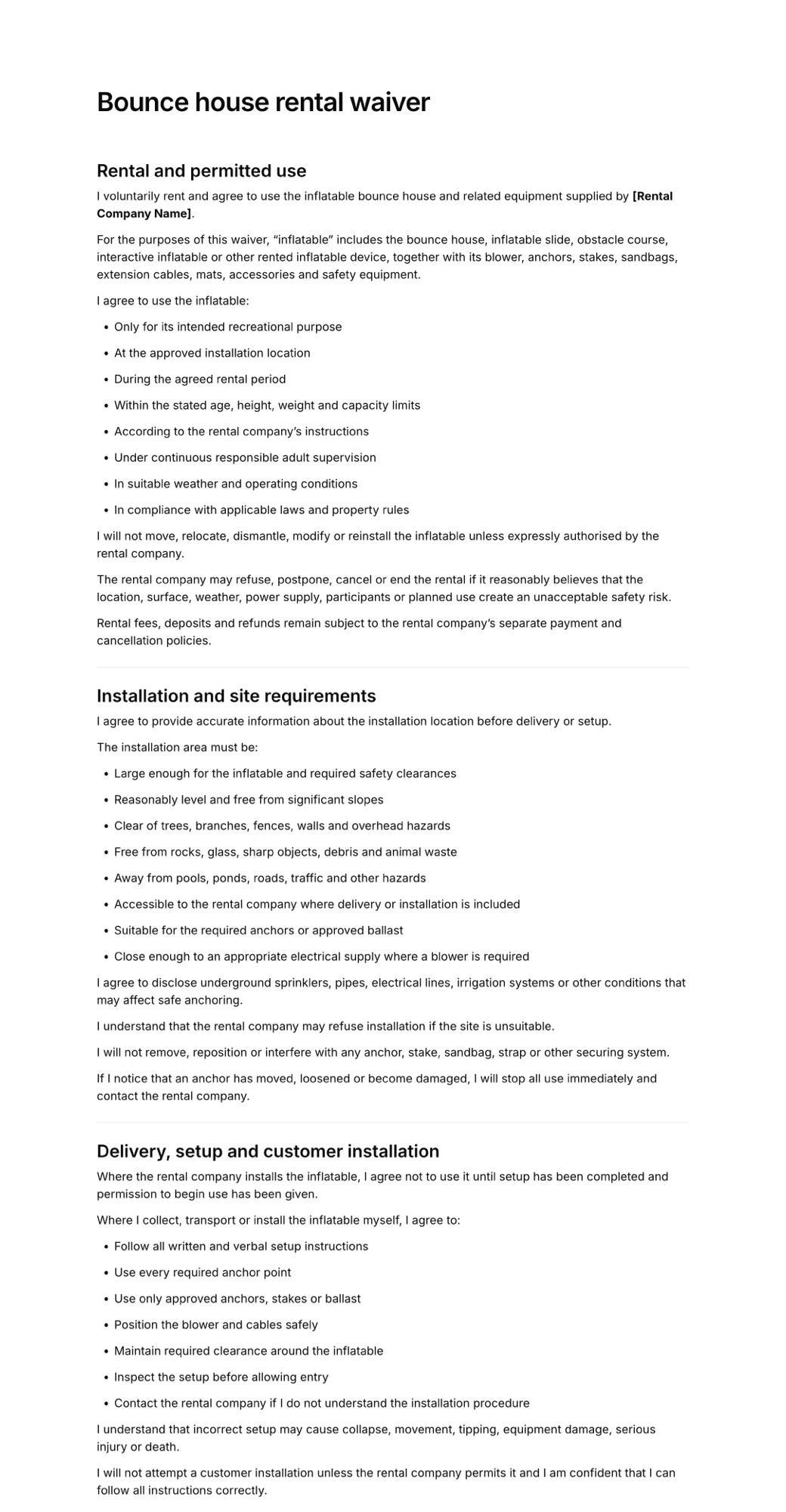
The bounce house rental waiver template follows this structure and can be edited for your units and service area.
Common mistakes in bounce house waivers
- No wind limit. "Don't use in bad weather" is vague. Give a specific wind speed and tell renters to clear the unit first.
- Leaving supervision implied. If the waiver doesn't say an adult must watch the unit, you can't show you required it.
- One waiver for every unit. A toddler bouncer, a 30-foot water slide and an obstacle course have different rules.
- Signing at delivery. A rushed signature on a tablet in the driveway is weaker than a waiver signed at booking.
- Forgetting the venue. Schools, churches and parks may need to be named or require their own waiver.
- Paper forms in the van. Carbon copies get wet, lost and mixed up between jobs.
Paper vs online bounce house waivers
Bounce house companies run on tight delivery schedules. Chasing signatures in the driveway slows setup and leaves gaps. Online waivers work better for most rental businesses:
- customers sign when they book, so the waiver is done before delivery day
- required fields stop missing addresses, phone numbers or initials
- you can search signed waivers by customer name or date in seconds
- hosts can share a participant link with parents before the party
- staffed events collect waivers by QR code at the unit entrance
Add the waiver link to your booking confirmation, or set up a waiver kiosk on a tablet at indoor venues. See how to create a QR code waiver for the setup, and our roundup of the best rental waiver software if you're comparing tools.
How to create a bounce house waiver online
You can set up an online bounce house waiver in a few minutes with AgreeDock.
Step 1: Start from a template or AI
Open the bounce house rental waiver template, or describe your units and service area to the AI waiver generator to get a draft written for your business.
Step 2: List your units and rules
Edit the units, risk list, capacity rules and wind limit so they match the inflatables you actually rent.
Step 3: Add renter, event and guardian fields
Add delivery address, event date, expected number of children, guardian details for participants, initials next to the supervision and weather rules, and a separate photo consent checkbox.
Step 4: Send it with the booking
Add the waiver link to your booking confirmation or invoice, so it's signed before your crew leaves the warehouse. For staffed events, print a QR code for the unit entrance.
Step 5: Check before setup
Before inflating a unit, confirm a signed waiver is on file. Each signed waiver is saved with a timestamp and can be downloaded as a PDF.
Frequently asked questions
Do bounce house rental companies need a waiver?
Most do. A bounce house waiver records that the renter understood the risks, agreed to supervise the unit and follow capacity and weather rules, and accepted responsibility for damage. Where local law allows, it can also limit certain claims. Your insurer may require signed waivers for every rental.
Who signs a bounce house waiver?
For backyard and event rentals, the renter or event host signs. For staffed events and indoor inflatable parks, each participant signs, or a parent or guardian signs for children. Many companies collect both.
What should a bounce house waiver include?
Most include renter and event details, the units covered, specific inflatable risks, adult supervision requirements, capacity and age rules, a wind and weather policy, setup and power terms, damage and deposit terms, photo consent, medical treatment consent where relevant, a release of liability, and a signature and date.
What wind speed is unsafe for a bounce house?
It depends on the unit, so follow the manufacturer's limit. Many inflatables must be cleared and deflated when winds reach around 15 to 20 mph. Put the specific limit in your waiver and make the renter responsible for clearing the unit when it's reached.
Is a bounce house waiver the same as a rental agreement?
They're often combined. The rental agreement covers booking, payment, delivery, damage and cancellation, while the waiver covers risks, rules and the release of liability. Combining them means the customer signs everything in one step.
Can bounce house waivers be signed online?
Yes. Electronic signatures are recognized in many countries, including under the ESIGN Act and UETA in the United States. Customers can sign when they book, and parents can sign on their phone by link or QR code, with a timestamped record of each waiver.