The best free waiver software is a tool with a free plan that never expires, not a 14-day trial. AgreeDock (10 signatures a month) and WaiverForever (20 submissions a month) are the two dedicated waiver tools with permanent free plans. Jotform and Tally are free form builders with signature fields, and Dropbox Sign's free plan covers a handful of signature requests.
Free plans are a good fit for small groups, new businesses and occasional events: a youth club, a weekend workshop, a personal trainer with a few new clients a month. The catch is that every free plan has a limit somewhere, and many "free" waiver tools are really trials. This guide lists the real free options, what each one limits, and when it makes sense to pay. AgreeDock is our product, so we've included it, and we've tried to be straight about where other tools fit better. Plans were checked on vendor websites in November 2026 and can change.
Quick comparison
| Tool | Free limit | Signature | Main catch |
|---|---|---|---|
| AgreeDock | 1 form, 10 signatures/mo | Yes | Needs internet, 1 active form |
| WaiverForever | 20 submissions/mo | Yes | Paid plans add metered usage |
| Jotform | 5 forms, 100 submissions/mo | Yes, 10 signed docs/mo | Branding, 500 stored total |
| Tally | Unlimited, fair use | Yes | No documented audit trail |
| Dropbox Sign | 3 requests/mo | Yes | Built for sending, not walk-ins |
| PandaDoc | 5 documents/mo | Yes | Public signing link is paid |
| Google Forms | Unlimited | No native signature | Typed name or add-on only |
| Free trials | Time or count limited | Yes | Ends, then you pay |
How we chose
We only included tools with a free plan you can keep using, plus a short note on trials at the end. For each, we checked the vendor's own pricing or help pages, based on vendor sites and public documentation. We looked at:
- A real signature. Can the signer draw or type a signature, or only tick a box?
- The free limit. Signatures, submissions or documents per month, and how many forms.
- Public link signing. Can anyone sign from a link or QR code, or do you have to email each person?
- Records. Can you keep and download what was signed?
- What happens when you outgrow it. The price of the first paid plan.
1. AgreeDock
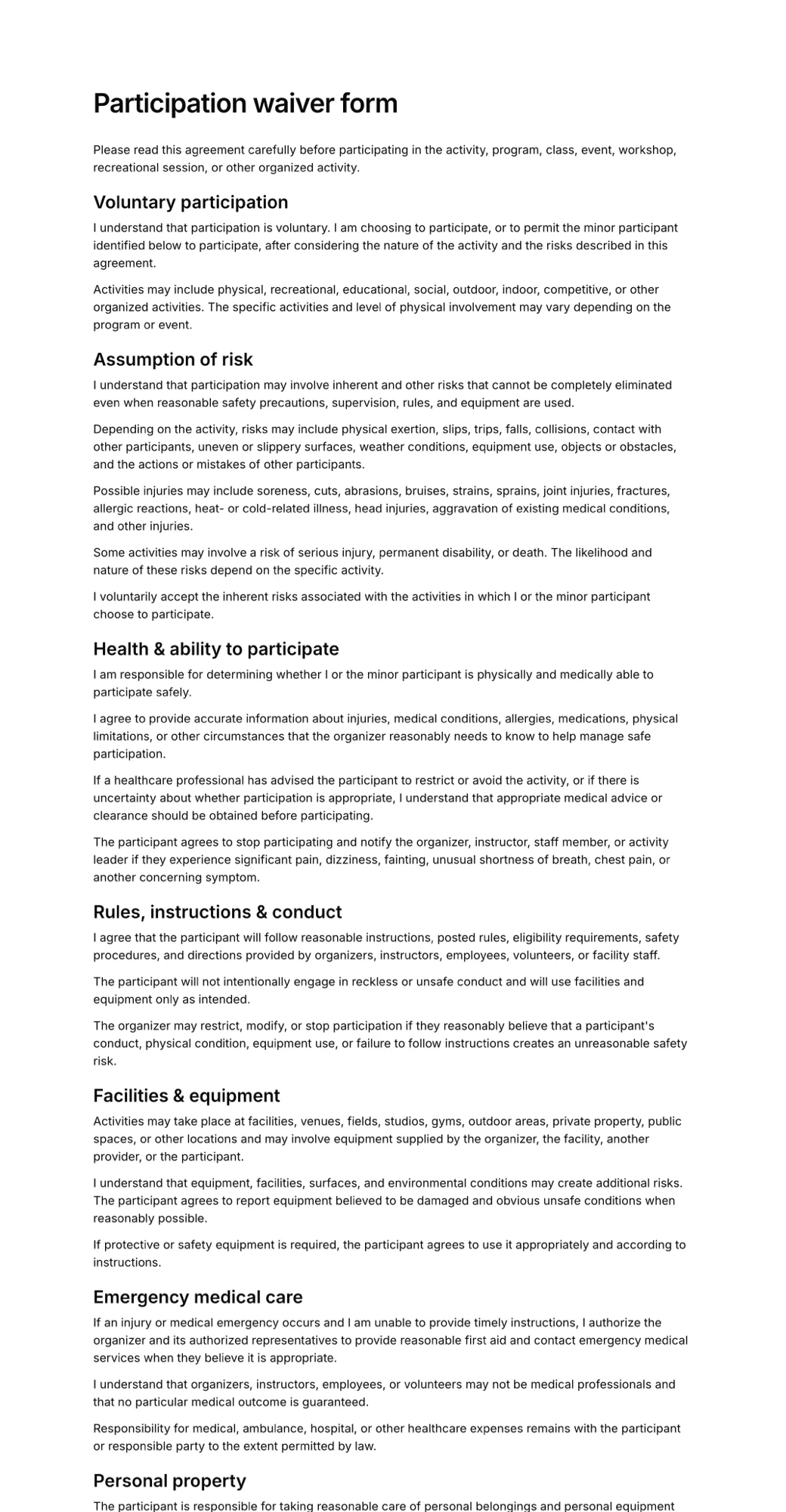
AgreeDock's free plan is a full waiver tool, not a cut-down demo. You get 1 active form with up to 10 signatures a month, forever. You can start from any of 100+ templates, such as the participation waiver form, or have the AI waiver generator draft one from a description of your activity. Customers sign by link, QR code or on a tablet in kiosk mode, and each signed form is stored with the exact wording agreed to and downloadable as a PDF. You can also download any template as a free PDF if you just need a paper waiver. See our free online waiver page for details.
Best for: Small groups, trainers and new businesses collecting up to 10 waivers a month, and anyone testing before they pay.
Pricing: Free forever. When you outgrow it, Pro is $15/month or $10/month billed yearly, with unlimited signatures and forms.
Strengths:
- Real waiver features on the free plan: templates, AI drafting, QR code, kiosk mode
- Guardian and minor section for parental consent
- Searchable records and a PDF of every signed form
- Paid plan is a flat price, so upgrading never leads to per-waiver bills
Drawbacks:
- Only 1 active form and 10 signatures per month on the free plan
- Needs an internet connection; no offline mode
- No native app, integrations, payments or file uploads
2. WaiverForever
WaiverForever has the most generous free plan among dedicated waiver tools: 20 submissions per month with its basic features, including the native app, QR codes, offline mode, the templates gallery, age validation, check-in and unlimited storage. Prepaid packs and referrals can add more free submissions.
Best for: Seasonal or low-volume businesses that want a native app and offline mode for free.
Pricing: Free plan with 20 submissions per month. Paid plans start at $19/month (Essential), as listed in November 2026, with 50 submissions included and $0.10 per waiver for the next 250.
Strengths:
- 20 free submissions a month, double AgreeDock's free limit
- Native app and offline mode on the free plan
- Unlimited storage
Drawbacks:
- Paid plans meter every waiver above 50, so costs grow with volume
- Team users and extra devices need paid plans
3. Jotform
Jotform's free Starter plan includes 5 active forms, 100 submissions per month and 10 signed documents per month, plus a large library of waiver templates. It is a general form builder, so you get a lot of flexibility but fewer waiver-specific features.
Best for: Businesses that need several free forms, with waivers being one of them.
Pricing: Free Starter plan. Bronze starts at $34/month billed annually ($39 monthly), as listed in November 2026.
Strengths:
- 5 active forms on the free plan
- Large template library
- Link, embed or email sharing
Drawbacks:
- 10 signed documents per month through Jotform Sign
- Only 500 stored submissions in total
- Jotform branding on free forms, and single user only
4. Tally
Tally is a free-first form builder whose signature block is free for all users. The free plan allows unlimited forms and submissions within fair use limits. Signatures are saved as images with each submission, and you can download a submission as a PDF.
Best for: Budget-conscious organizers who are comfortable building their own waiver form.
Pricing: Free plan. Pro is €20/month, as listed in November 2026.
Strengths:
- Signature field free with no fixed monthly cap
- Simple form builder, link sharing
Drawbacks:
- No documented signing audit trail
- No waiver templates or minor handling built in
- Its help page asks you to check local e-signature rules yourself
5. Dropbox Sign
Dropbox Sign (formerly HelloSign) is an e-signature tool with a free plan of 3 signature requests per month. Self-signing is unlimited, and completed requests include an audit trail.
Best for: Sending an occasional waiver to a named person by email.
Pricing: Free plan with 3 signature requests per month. Essentials starts at $15/month, or $10.05/month billed yearly, as listed in November 2026.
Strengths:
- Audit trail on completed requests
- Familiar e-signature workflow
Drawbacks:
- 3 requests a month is too few for most waiver use
- Built around emailing documents, not walk-in or QR code signing
- No waiver-specific features such as minor sections or kiosk mode
6. PandaDoc
PandaDoc's free plan includes 5 documents per month and up to 5 templates. It is a proposal and document tool, and its public signing link (Forms) is only on the Business and Enterprise plans.
Best for: Businesses already using PandaDoc for proposals that need a rare signed waiver.
Pricing: Free plan with 5 documents per month. Starter is $19/seat/month billed annually, as listed in November 2026.
Strengths:
- Strong document and e-signature features
Drawbacks:
- Public link signing needs the Business plan
- Low free document limit for waivers
7. Google Forms and Microsoft Forms
Google Forms and Microsoft Forms are free and easy, but neither has a native signature question. Common workarounds are a typed-name "I agree" question, a file upload of a signed page, or a paid add-on.
Best for: Collecting registration details, not signed waivers.
Pricing: Free with a Google account or Microsoft 365.
Strengths:
- Free and familiar
- Unlimited responses
Drawbacks:
- No drawn signature without add-ons
- Little record of signing intent beyond a timestamp and email
- File uploads in Google Forms require signers to log in to Google
If you use a typed-name approach, make sure the form clearly states that typing a name counts as a signature, and keep a copy of the exact wording. A dedicated tool does both automatically.
8. Free trials (not free plans)
Several popular waiver tools offer trials but no free plan. They are useful for testing, not for running long term at no cost:
- Smartwaiver: free trial, then paid plans from $22/month for 100 waivers, as listed in October 2026
- WaiverFile: trial of 30 days or 100 waivers, then from $19/month
- Waiver Electronic: 15-day trial, then from $11.99/month in year one
- Waiver Master: trial with 30 submissions and 1 form, then from $9.99/month
- WaiverSign: 7-day trial, then from $19/month
For a full comparison of paid tools, see our best waiver software roundup.
How to choose free waiver software
Count your busiest month. If you collect fewer than 10 waivers in your busiest month, AgreeDock's free plan covers you. Up to 20, WaiverForever's free plan does. Above that, you will need a paid plan or a general form builder with weaker waiver features.
Check the signature, not just the form. A free online waiver needs a real signature and a stored copy of what was signed. Google Forms alone does not give you that.
Public link or email? Waivers usually need a link or QR code that anyone can open. E-signature tools like Dropbox Sign and PandaDoc are built around sending to named people, and public links are often on paid plans.
Minors. If children take part, use a form with a parent or guardian section. In AgreeDock you add a guardian and minor section so the parent signs. WaiverForever's free plan includes age validation. See waivers for minors.
Offline. WaiverForever's free plan includes offline mode. AgreeDock needs internet.
Health data. No free plan here is a good place for medical records. If your form collects health information, check which rules apply to you before you pick a tool.
When it's worth paying
Free plans make sense while you are small or testing. It's time to pay when:
- you regularly hit the monthly limit and have to turn people away or fall back to paper
- you need more than one active waiver, for example separate forms for adults, minors and rentals
- you want to remove another company's branding from your forms
- staff need their own logins
When you do upgrade, compare the paid price at your real volume. A flat plan like AgreeDock Pro ($15/month, unlimited signatures) stays the same during your busy season, while per-waiver plans rise with it.
Frequently asked questions
What is the best free waiver software?
AgreeDock and WaiverForever are the two dedicated waiver tools with permanent free plans. AgreeDock gives you 1 active form and 10 signatures a month with templates and AI drafting. WaiverForever gives you 20 submissions a month with its native app and offline mode.
Is there a free online waiver I can use?
Yes. With AgreeDock's free plan you can pick a waiver template, edit it and share it by link or QR code, and collect up to 10 signatures a month. You can also download templates as free PDFs if you prefer paper.
Can I make a free digital waiver with Google Forms?
You can collect details and an I agree checkbox, but Google Forms has no native signature field. You would need a typed-name workaround or a paid add-on, and the record of signing is thin. A free plan from a dedicated waiver tool is usually a better fit.
Does Smartwaiver have a free plan?
No. Smartwaiver offers a free trial, then paid plans start at $22 per month for 100 waivers on monthly billing, as listed in October 2026. See our guide to Smartwaiver alternatives.
Is free waiver software legally binding?
A free plan is no less valid than a paid one. What matters is the wording of your waiver, a clear signature, a record of what was agreed and local law. Have your waiver reviewed by a lawyer where you operate.
How many waivers can I collect for free?
AgreeDock allows 10 signatures a month and WaiverForever 20 submissions a month. Jotform's free plan allows 10 signed documents a month, and Dropbox Sign allows 3 signature requests a month.
What is the cheapest paid waiver software after the free plan?
AgreeDock Pro is $10 per month billed yearly, or $15 monthly, with unlimited signatures. Waiver Master starts at $9.99 per month but is capped at 100 submissions.